

More and more popular PC games can now be played in VR using community-made mods. From Resident Evil and Cyberpunk 2077 to Marvel’s Spider-Man, you can step right into these game worlds with a VR headset. Some mods even support motion controllers, making the experience feel almost like a native VR game.
But how do you know which games have VR mods, where to download them, and which ones are actually worth trying?
In this guide, I’ll introduce UEVR, REFramework, UUVR, R.E.A.L. VR, vorpX, and game-specific VR mods. I’ll also show you how to use PCVR Central to find compatible games, compare mod quality and installation difficulty, and download mods from their original creators. Finally, I’ll walk through installing and launching three different VR mods using a Meta Quest headset.
Types of PCVR Games
Did you know that more and more PC games can now be played in VR using VR mods? You can put on your Meta Quest 3 or 3S and step right into the game world! Many well-known AAA titles, including Final Fantasy VII, Cyberpunk 2077, the Resident Evil series, Onimusha: Way of the Sword, and Spider-Man, have VR mods created by developers. Some even support VR controllers, letting you handle weapons with both hands and reload manually, making them feel almost like native VR games.
Most of these VR mods are available for free. As long as you own the PC game, you can play it in VR and experience its world all over again. However, there are many different types of VR mods. Some support a wide range of games, while others are designed for just one specific title. These mods are also scattered across websites run by creators around the world.
In this guide, I’ll explain the different types of VR mods available, where to find and download them, and how to install them and start playing with your Meta Quest!
Based on how VR support is implemented, PCVR games can be divided into three categories.
Native PCVR Games
Games like Valve’s Half-Life: Alyx and Meta’s Asgard’s Wrath were developed and released specifically for VR. They have full VR support built in, so you don’t need to install any third-party VR mods.
However, VR gaming has gradually shifted toward standalone headsets in recent years. As a result, fewer PCVR-exclusive games are being released, and major AAA titles have become even rarer.

General-Purpose VR Mods
Most game developers use Unreal Engine or Unity to create 3D PC games, while some studios develop their own game engines.
- Unreal Engine: Known for high-quality 3D graphics and large-scale games. Examples include Final Fantasy VII Remake, Hogwarts Legacy, and Ace Combat 7: Skies Unknown.
- Unity: Widely used for both 2D and 3D game development. Examples include Genshin Impact, Subnautica, and Outer Wilds.
- RE Engine: Capcom’s in-house 3D game engine, used in the Resident Evil series, Onimusha: Way of the Sword, and Devil May Cry 5.
- RAGE: Rockstar Games’ proprietary 3D game engine, used in Grand Theft Auto V and Red Dead Redemption 2.
- REDengine: An open-world 3D game engine developed by CD Projekt RED, used in The Witcher 3: Wild Hunt and Cyberpunk 2077.
General-purpose VR mods take advantage of the shared architecture of game engines, allowing a single tool to support multiple games built on the same engine. Some well-known examples include UEVR, REFramework, and UUVR, each designed to work with a different game engine.
| VR Mod | Supported Game Engine | VR Mod Compatibility |
|---|---|---|
| UEVR | Unreal Engine 4 / 5 | O |
| REFramework | Capcom RE Engine | O |
| UUVR | Unity | ▲ |
O: Many compatible games are already available.
▲: Currently supports fewer games, with several compatibility issues still unresolved.
Next, let’s take a closer look at these three VR mods.
UEVR: Unreal Engine Games
UEVR was developed by Praydog and is designed primarily for games built with Unreal Engine 4 and 5. It can turn a large number of compatible games into VR experiences. Once you launch the mod, it feels like you’re inside the game world, but you usually can’t use your hands to interact with it. You’ll still need a regular gamepad for most games.

However, some games have custom profiles and plugins created by other modders that add VR motion controller support, sometimes making them feel almost like native VR games. For example, there’s a custom VR controller profile for Hogwarts Legacy that lets you wave your wand, aim at targets, and cast spells using your VR controllers.
For a complete guide to installing and using UEVR, check out the tutorial here.

UEVR Setup Guide
Turn Flat PC Games Into VR & Stand Next to Tifa

Master UEVR Advanced Settings
Fix Crashes, Boost FPS & Optimize VR

UEVR 6DOF Window Guide
Open a Portal to Your Game World
REFramework: Capcom RE Engine Games
REFramework was also developed by Praydog and is designed primarily for Capcom’s proprietary RE Engine. There are some really great games built with this engine, including the Resident Evil 2, 3, and 4 remakes, Resident Evil 7 biohazard, Resident Evil Village, Resident Evil Requiem, Onimusha: Way of the Sword, and Monster Hunter Rise.
REFramework isn’t just a VR mod. It’s also a mod loader and scripting framework. It adds VR support to several RE Engine games, with Resident Evil 2 and 3 Remakes, Resident Evil 7, and Resident Evil Village also supporting VR motion controls.
But here’s the thing! Playing Resident Evil on a flat screen and playing it with a VR headset are two completely different experiences.
Take Resident Evil 7, for example. There are no zombies or hordes of enemies at the beginning. But when I saw that first house, I wasn’t thinking about how to play the game. I was wondering whether I should even open that door.
In VR, it feels like you’re actually being captured and brutally murdered by a sadistic killer. Your mind is completely overwhelmed by fear. Chainsaws and knives are swinging right in front of your face, and you watch as the killer drives a chainsaw toward your stomach while speaking to you in a soft voice…
When Jack Baker shoved a knife toward my mouth at the dinner table, I actually felt sick. I couldn’t keep playing!
UUVR: Unity Games
UUVR is a general-purpose VR mod developed by Raicuparta for Unity games. It can add VR rendering and head tracking to certain games built with Unity.
You can download the mod from the developer’s GitHub page. He also created a quick installation tool called Rai Pal.

This mod is still in the early stages of development, and very few games work with it. I tested several Unity games from my own library, but most couldn’t even reach the title screen. For example, Two Point Hospital got stuck on the opening screen, while Dragon Quest Builders didn’t have a compatible version of UUVR available.
Custom VR Mods
These VR mods are developed for specific games chosen by their creators, with custom settings and features designed for each title. Some tools support dozens of games, while others are built for just one. Some even redesign how VR controllers work, making the experience feel almost like a native VR game.
Multi-Game Custom VR Mods
These VR mods aren’t limited to a single game engine. Instead, the developers choose which games to support and create custom VR functionality for each one. Two well-known examples are R.E.A.L. VR and vorpX, which use different pricing models.
| Mod Name | Supported Games | Price |
|---|---|---|
| R.E.A.L. VR | Dozens of popular PC games, with VR support developed individually for each title | Free public version; Patreon subscription at €9/month for early access to new games and the latest features |
| vorpX | A wide range of PC games from different generations and game engines | €39 one-time purchase |
R.E.A.L. VR
Developed by Luke Ross, R.E.A.L. VR is designed to bring popular PC games into VR. It currently supports dozens of well-known titles, including Elden Ring, Ghost of Tsushima, Dark Souls, Marvel’s Spider-Man, Watch Dogs, and The Last of Us. Many games originally released on PlayStation and later ported to PC are also included in the free VR mod lineup. Games available through paid early access include Grand Theft Auto V Enhanced and Death Stranding 2: On the Beach.
The mod provides stereoscopic 3D VR and head tracking, letting you step right into these game worlds, although you’ll still use a regular gamepad to play. Most supported games are available for free. The developer also offers a paid early access version, giving Patreon subscribers early access to newly supported games. You can find the complete list of supported games on the developer’s Patreon page.
vorpX
Developed by Ralf Ostertag, vorpX can convert a wide range of PC games from different generations and game engines into VR. It currently supports over 250 3D games, including The Witcher 3: Wild Hunt, Batman: Arkham Knight, Battlefield V, and Tomb Raider.
vorpX provides stereoscopic 3D VR and head tracking, and also lets you play games in Portal Mode. You’ll still use a regular gamepad for controls. vorpX is paid software and costs €39. You can check the list of supported games on the official website.
Installation:
- Purchase and download vorpX from the official website, then complete the installation and activation.
- Launch vorpX Control, then start a supported PC game. vorpX will automatically load the corresponding VR profile.
Game-Specific VR Mods
These mods are built specifically for individual games. Since developers don’t have to worry about compatibility with other titles, they can make deeper changes to the camera, weapons, character movements, and interactions. Some even feel almost like native VR games.
Here are a few examples:
- Titanfall 2: CircuitLord’s VR mod starts with a calibration step where you extend both arms, just like in the VR game UNDERDOGS. It also supports two-handed weapon handling, manual reloading, and piloting mechs.
- R.E.P.O.: RepoXR adds VR motion controller support, letting you reach out to grab, carry, and rotate objects directly in the game.
- Big Walk: Big Walk VR supports grabbing and throwing objects with both hands, along with multiplayer co-op.
Most of these VR mods are available for free from individual developers. Some even come with their own installers, allowing you to jump right into the game using VR controllers once everything is installed.
However, each game has its own mod creator, download page, and installation process. With mods scattered across GitHub, Thunderstore, Patreon, and other websites, finding a VR mod for a specific game can be a real hassle.
PCVR Central: Find, Compare, and Download VR Mods
The VR mods I covered earlier—UEVR, REFramework, UUVR, R.E.A.L. VR, and vorpX—all have official developer websites. But things aren’t so straightforward with other VR mods! Some creators host their mods on GitHub, others release them through Patreon, and many custom mods are scattered across Nexus Mods, Thunderstore, or the creators’ own websites.
| Game | VR Mod | Download Source |
|---|---|---|
| Titanfall 2 | Titanfall 2 VR | CircuitLord / GitHub |
| Lethal Company | LCVR | DaXcess / Thunderstore |
| R.E.P.O. | RepoXR | DaXcess / Thunderstore |
| Big Walk | Big Walk VR | CircuitLord / GitHub |
| Half-Life 2 | Half-Life 2: VR Mod | Free Download on Steam |
With VR mods scattered all over the internet, how am I supposed to know if a game I own has a VR mod? Having to Google every game and dig through search results just to find a download link is a real hassle.
That’s where PCVR Central comes in. It’s a website dedicated to cataloging PCVR games and VR mods from different developers. It brings everything together in one place, with VR mod quality ratings, installation difficulty, free and paid classifications, and download links to the original creators’ websites.
Just enter the name of a game you’re interested in, and you can see which VR mods are currently available for it. I’ll use the excellent Titanfall 2 VR mod as an example to show you how to find and download a mod.
Step 1: Search for a Game
Go to PCVR Central, enter the game’s English title in the search bar, and click Search to find the game.

Step 2: Choose a VR Mod
On the game’s page, you’ll see a brief description and its current price on Steam at the top. Below that, the VR Conversions section lists the available VR mods. Some games have multiple VR mod options, such as UEVR profiles or other VR conversion tools.

Here’s what each filter means. You can use these options to quickly narrow down the VR mods that best suit your needs:
- Mod Source: Includes UEVR, UUVR, REFramework, R.E.A.L. VR, vorpX, and Dedicated VR Mod (custom mods built for individual games).
- Mod Quality (Important):
- Native-like: The controls and overall experience feel almost identical to a native VR game. Examples include Resident Evil 2 and 3 Remakes, Resident Evil 7, Resident Evil Village, and Half-Life 2.
- Excellent: Offers a great VR experience, although some controls or visuals may still have minor issues. Examples include Black Myth: Wukong, Marvel’s Spider-Man Remastered, and Grand Theft Auto V.
- Playable: The game is playable, but some controls or visuals aren’t fully polished. For example, Resident Evil 4 has more camera movement in VR, which can make motion sickness more likely.
- Experimental: VR support is still incomplete, and the experience is often uncomfortable. I’d recommend skipping mods in this category.
- Installation Difficulty: Personally, I don’t think there’s much difference between Easy and Moderate. Both usually involve installing software or copying files.
- Easy Install: Just run a specific program or copy the mod files into the game folder. UEVR and REFramework usually fall into this category.
- Moderate Install: Requires installing a mod manager or additional software. R.E.A.L. VR, vorpX, and game-specific VR mods with dedicated installers usually fall into this category.
- Advanced Install: Involves more complicated setup steps, such as installing multiple mods, manually editing configuration files, or resolving compatibility issues.
- Motion Controls (VR Controller Support):
- Full Motion Controls: You can use VR controllers to aim, handle weapons, and interact with objects in the game.
- Partial Motion Controls: Supports some VR hand interactions, but other actions may still require traditional button controls.
- Gamepad Only: Uses a regular gamepad, without VR motion controller support.
- None: No VR motion controls.
- Price (Mod Pricing):
- Free: Free to use. The vast majority of VR mods are available for free.
- Paid: Requires payment, usually for games supported through R.E.A.L. VR or vorpX.
I’d recommend choosing mods rated Native-like or Excellent for a much smoother VR experience.

Step 3: Download the Mod
Click Open Mod Page to visit the original mod creator’s website. You’ll usually find the mod download files and installation instructions there.

If you’re on GitHub, click Releases on the right side of the page.

You’ll find the download links under Assets.

How to Install and Use VR Mods
Once you’ve found a VR mod you like, the next step is installing it! Most VR mods are fairly easy to install. Some only require extracting files into the game folder, others need a mod manager, and some developers even provide their own installers.
I’ll use three different free VR mods as examples to show you how to install and launch each one.
Before You Start
First, make sure the game is installed on your PC and runs properly. Next, connect your Meta Quest 3 or 3S to your PC, usually through Steam Link or Virtual Desktop.
On PCVR Central, you can check each mod’s runtime requirements by clicking Full Details on its information page.
Different VR mods use different VR runtimes. Some use OpenVR, while others use OpenXR, and SteamVR supports both. If a mod supports OpenXR, you can usually switch to Virtual Desktop’s VDXR runtime and run it without SteamVR.
For instructions on installing and setting up SteamVR and Virtual Desktop, check out these two guides:
How to Play SteamVR on Meta Quest
Setup & Best Settings Guide

Virtual Desktop Ultimate Guide
Best Settings for Meta Quest PCVR
I don’t really recommend using Meta Horizon Link for PCVR gaming. The software has quite a few bugs and frequently conflicts with NVIDIA graphics drivers.

REFramework: Manual VR Mod Installation
This is the most common installation method. Just download the ZIP file provided by the mod creator and extract it into the game’s installation folder.
I’ll use REFramework, which supports the Resident Evil series, as an example.
Step 1: Find the Game Folder
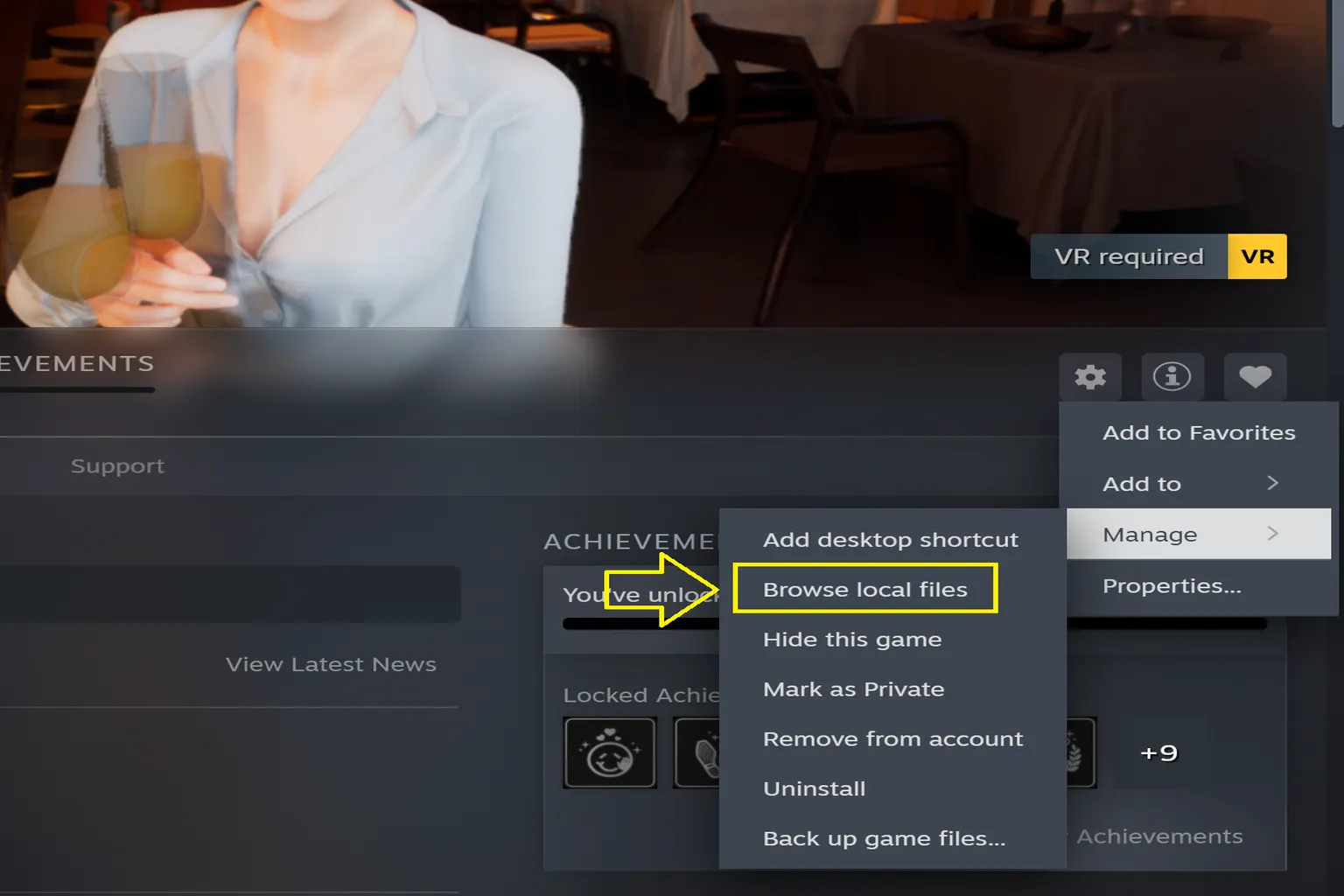
In your Steam Library, right-click the game and select Manage → Browse Local Files to open its installation folder.
Step 2: Download and Install the VR Mod
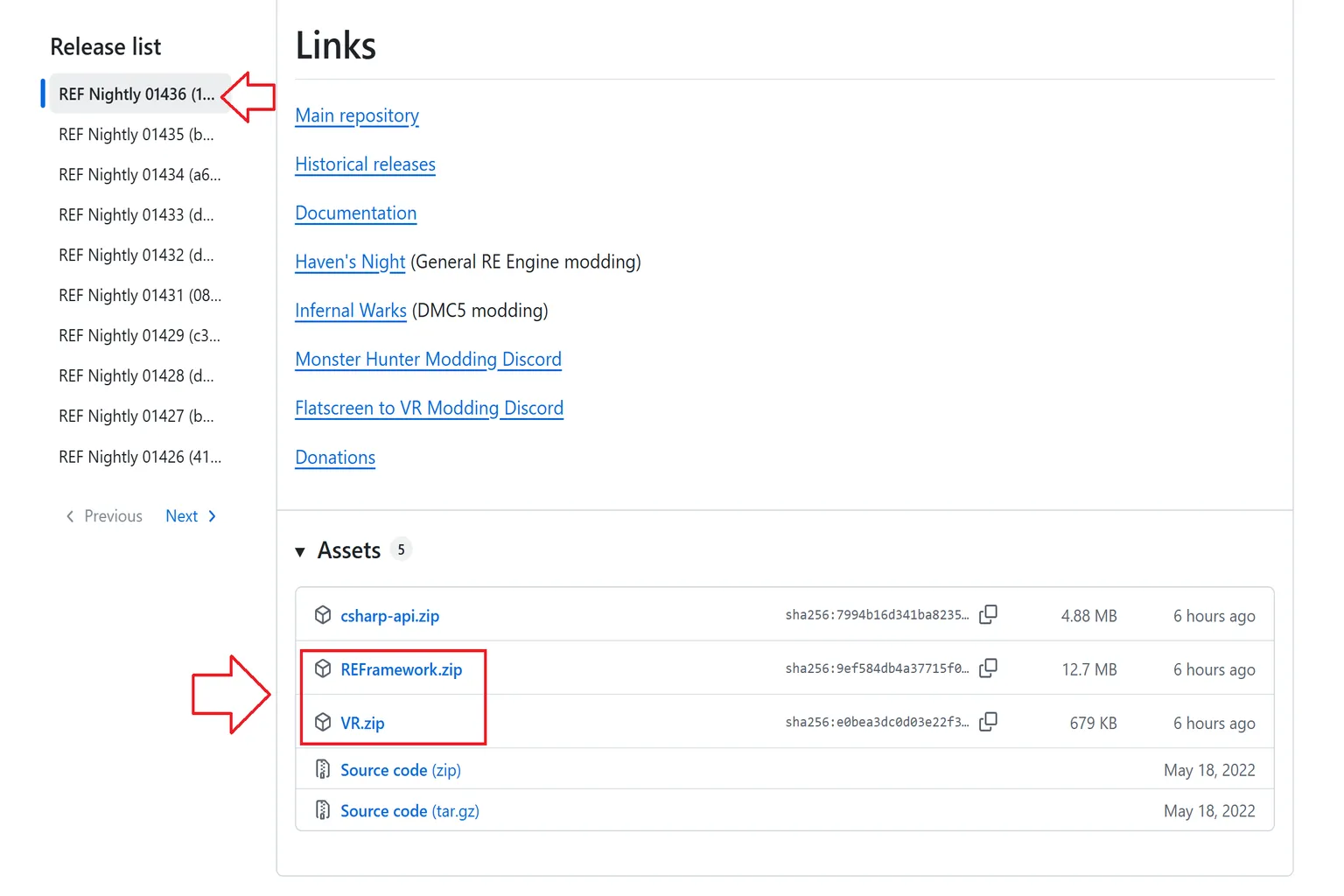
Go to the REFramework developer’s GitHub page and download the latest versions of REFramework.zip and VR.zip from the Releases section. Extract the contents of both ZIP files into the folder containing the game’s executable.
Step 3: Launch the Game in VR
Connect your Meta Quest to your PC, launch SteamVR, then start the game from Steam. Once the game launches, you can jump right into the game world through your VR headset.
If you want to run the game through Virtual Desktop without SteamVR, delete the openvr_api.dll file extracted from VR.zip, then set OpenXR Runtime to VDXR in Virtual Desktop Streamer. This lets you bypass SteamVR and launch the game directly for smoother performance.
You can also press the Insert key on your PC keyboard to open the REFramework settings menu and adjust the VR options. However, these are advanced settings, so I’d recommend leaving them as they are.

R.E.A.L. VR: Installing the Free Mod
R.E.A.L. VR now offers a free public version that adds VR support to several popular PC games. Installation is pretty straightforward. Just download a ZIP file and extract its contents into the game folder.
Here’s how to install and launch the free version.
Step 1: Download the Free VR Mod
Go to Luke Ross’s official download page and scroll to the attachments at the bottom of the post. Download REAL_VR_by_LukeRoss_v2607.31.1_public.zip. If a newer version is released, the filename may change, but you’ll find it in the same location.

Step 2: Install the VR Mod
First, launch the PC game you want to play and make sure it runs properly. Then extract the downloaded ZIP file and copy all its contents into the folder containing the game’s executable.
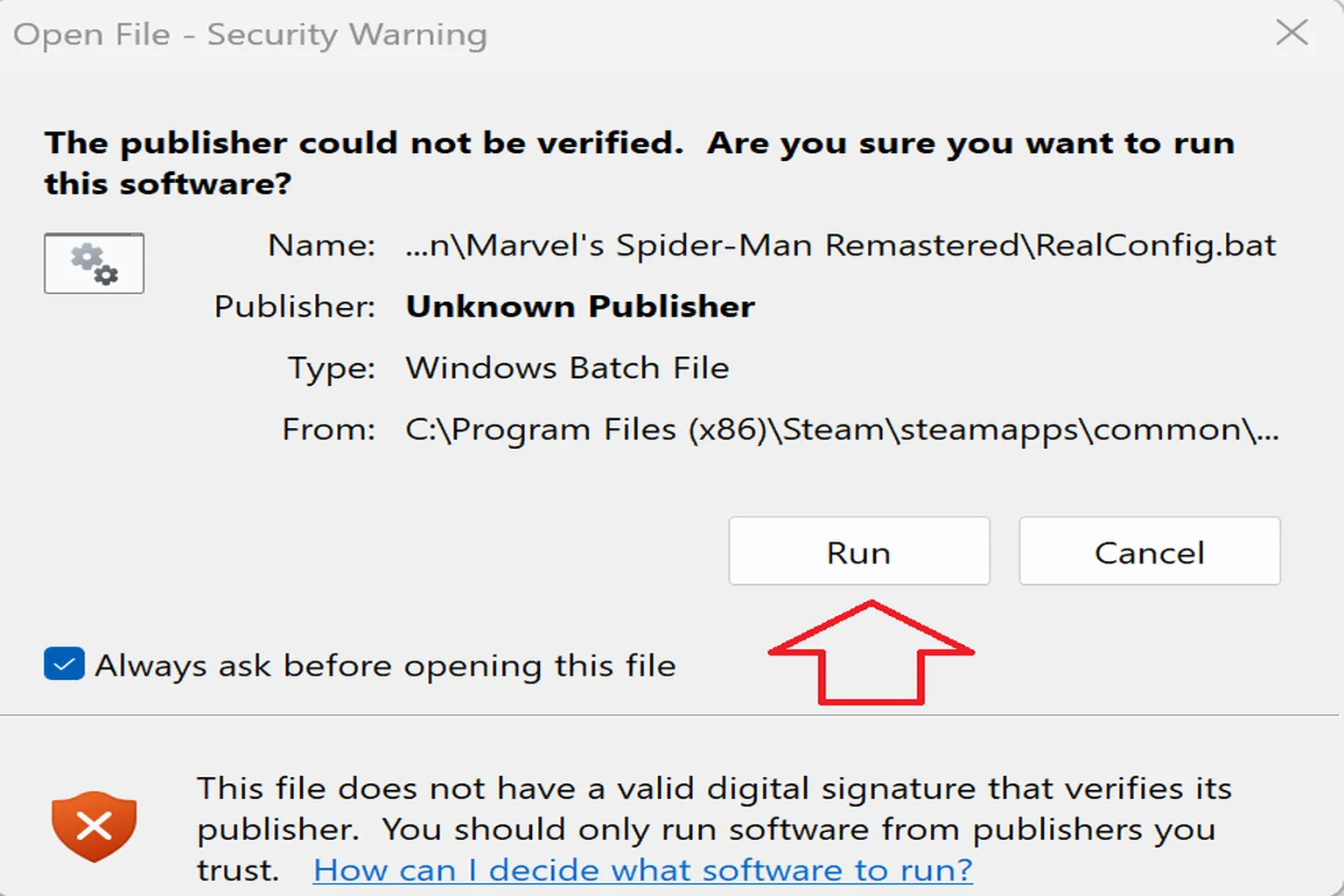
Next, run RealConfig.bat.

A Windows warning will appear saying the publisher couldn’t be verified. Click Run to complete the setup.
Step 3: Launch the Game in VR
First, connect your Meta Quest to your PC, then launch the PC game as you normally would. R.E.A.L. VR will automatically load in VR mode.
However, when the game starts, the mod’s VR overlay blocks your view. You’ll need to press the Pause key on your keyboard to close it. I use an 80% compact keyboard, and after looking everywhere, I realized it doesn’t even have a Pause key!
Click the small box indicated by the arrow to reassign the Pause function to another key. You can then use that key to close the overlay.

Games using R.E.A.L. VR are mainly played with a regular gamepad. You can view the game in stereoscopic 3D through your VR headset and freely look around by moving your head.
For example, in Marvel’s Spider-Man, you can get an up-close look at Peter Parker’s room, with even the blueprints for his web shooters on the desk clearly visible.

Titanfall 2 VR: Dedicated Mod Installer
Some mod developers provide dedicated installers, so you don’t have to find the game folder or copy files manually. For example, CircuitLord, the creator of the Titanfall 2 VR mod, provides a dedicated installer that handles the setup for you.
Step 1: Download the VR Mod Installer
Go to CircuitLord’s GitHub releases page and download CircuitLordVRModInstaller.exe from the Assets section of the latest release.
Since this installer doesn’t have many downloads, Microsoft Edge may show extra download warnings and confirmation prompts. I’d recommend using Chrome or another browser to avoid the hassle.
Step 2: Install Titanfall 2 VR
Run CircuitLordVRModInstaller.exe and select Titanfall 2 VR. The installer will automatically locate Titanfall 2 on your PC.

If the installer can’t find the game, click Change under Find Titanfall 2 to manually select the game folder.
Next, click Sign in EA App to sign in to the EA app, then click Titanfall 2 VR Install. The installer will automatically install the VR mod.

Step 3: Launch the Game in VR
Connect your Meta Quest to your PC and launch SteamVR or Virtual Desktop. Then open CircuitLord VR Mod Installer and click Launch in VR in the upper-right corner.
Once the game finishes launching, you’ll be able to play in VR.
Keep in mind that Titanfall 2 VR must be launched using Launch in VR from the installer. If you launch Titanfall 2 directly from Steam, you’ll get the original flat-screen version instead.
This VR mod supports two-handed weapon handling and piloting Titans, with controls that feel very close to a native VR game.

Other VR mods follow similar installation methods. Some require extracting ZIP files into the game folder, while others can be installed through a mod manager or dedicated installer. Before downloading, check the installation instructions provided by the mod creator, then launch the game using the appropriate VR runtime.
In the past, if you wanted to play VR games on your PC, you were limited to games built specifically for VR. Now we have engine-based VR mods like UEVR, UUVR, and REFramework, multi-game tools like R.E.A.L. VR and vorpX, and a growing number of game-specific VR mods created by individual developers.
Many popular games that were originally only playable on a flat screen can now be experienced in VR. Give some of those AAA games another try in VR! Playing a game on a monitor and actually stepping into its world are two completely different experiences.
FAQ
Can Every PC Game Be Converted to VR with a VR Mod?
Not every PC game has a VR mod. For games built with Unreal Engine 4 or 5, you can try UEVR. For games using Capcom’s RE Engine, check out REFramework. For other games, you can search PCVR Central to see if anyone has created a dedicated VR mod.
Can I Play PC Game VR Mods on Meta Quest 2, 3, or 3S?
Yes. As long as your PC can run the game, you can connect your Meta Quest using Steam Link, Virtual Desktop, or another PCVR connection method and play with a compatible VR mod.
Are VR Mods Free?
Most VR mods are free, including UEVR, REFramework, and many game-specific mods. R.E.A.L. VR also offers a free public version, although newly supported games require a paid subscription for early access. vorpX, on the other hand, is paid software available as a one-time purchase.
Can I Use Meta Quest Controllers with VR Mods?
It depends on the mod. Some only provide stereoscopic 3D and head tracking, so you’ll still need a regular gamepad. Others support full VR motion controls, letting you aim, handle weapons, and grab objects with your hands. You can check the Motion Controls section on PCVR Central to see what each mod supports.
How Do I Find the Game Folder After Downloading a VR Mod?
For Steam games, right-click the game in your Library and select Manage → Browse Local Files. Most manually installed VR mods require you to place the downloaded files in the folder containing the game’s executable. Some mods also come with dedicated installers that can automatically locate the game on your PC.