
Bought a Meta Quest but regret the purchase? Or maybe a new game made you feel too motion-sick to play? You do not have to feel stuck. Meta Quest’s return and refund policies are remarkably flexible if you know the rules. In this complete guide, we compare return policies across major retailers like Amazon, Best Buy, and the official Meta Store. We also walk you through the simple, self-service steps to refund Quest games on your phone or PC. Whether it is hardware issues or software disappointment, follow our roadmap to get your money back without the hassle.
Meta Quest Hardware and Accessories Refunds
The conditions for returning a Meta Quest because you bought it but decided it wasn’t for you depend on where you purchased it. In most cases, refunds are possible, but the rules and time limits vary by retailer, so the first thing you should do is check the specific policy for the store you bought it from.

Amazon
Online Purchase
Return Window: 30 Days
Refund Amount: Full

Best Buy
Returns accepted even if opened
Return Window: Usually 14 days
Refund Amount: Full

Meta Store
Opened items accepted, pickup included
Return Window: 30 Days, even if opened/used
Refund Amount: Full
Amazon
Amazon Return Conditions
- Return window: within 30 days
- Product issues such as damage, defects, or torn packaging: full refund, with return shipping covered by Amazon
- Buyer-initiated returns such as not liking the product or purchasing by mistake: full refund if unopened, 50% refund if opened
Big-box stores
Typical return policies at stores like Best Buy are generally as follows.
- Return Window: Within 15 days
- You can return the product within 15 days of purchase with proof of purchase.
- The item must be returned with original packaging and all accessories, and be in like-new condition.
- Restocking fees are not usually charged for general electronics, but may apply to specific product categories or conditions.
Meta Official Store
The Meta official store is the only seller that allows a full refund even after the headset has been opened. The return conditions are as follows.
- Return window: within 30 days
- Unopened: full refund
- Opened: full refund
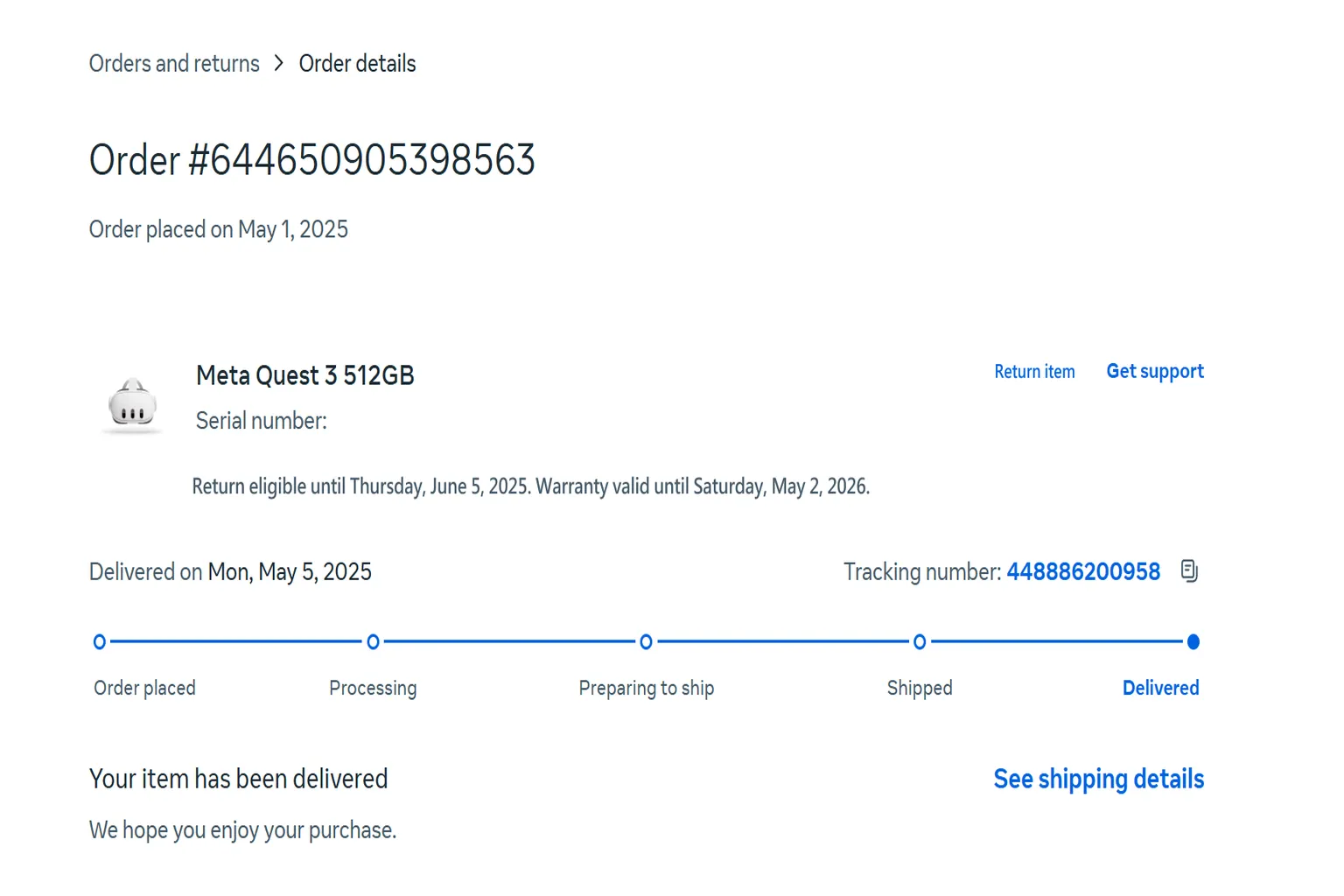
The return period starts from the day you receive the headset. For example, if delivery was completed on May 5, 2025, you can request a return until June 5.
How to Return a Meta Quest Purchased from the Official Meta Store
If you bought a Meta Quest 3 or 3S from the official Meta website and want to return it within one month, Meta generally won’t reject the request. That applies whether the reason is a defect, motion sickness, simply not liking it, or even needing the money. The only exception is severe user-caused damage, in which case Meta may charge a repair fee.
The return process works like this.
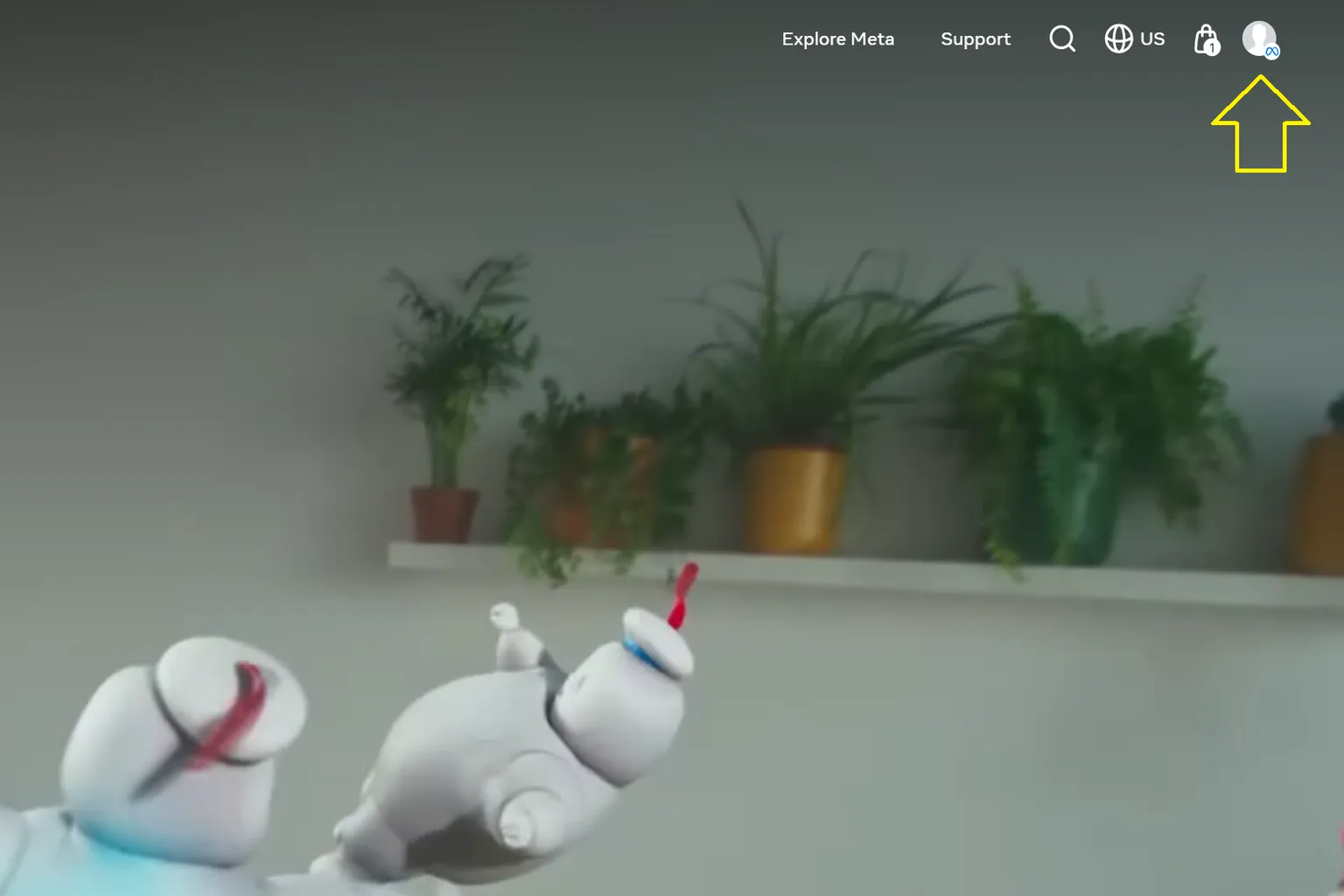
Step 1: Go to your account page.
Log in to the official Meta website and click the avatar icon in the top-right corner.
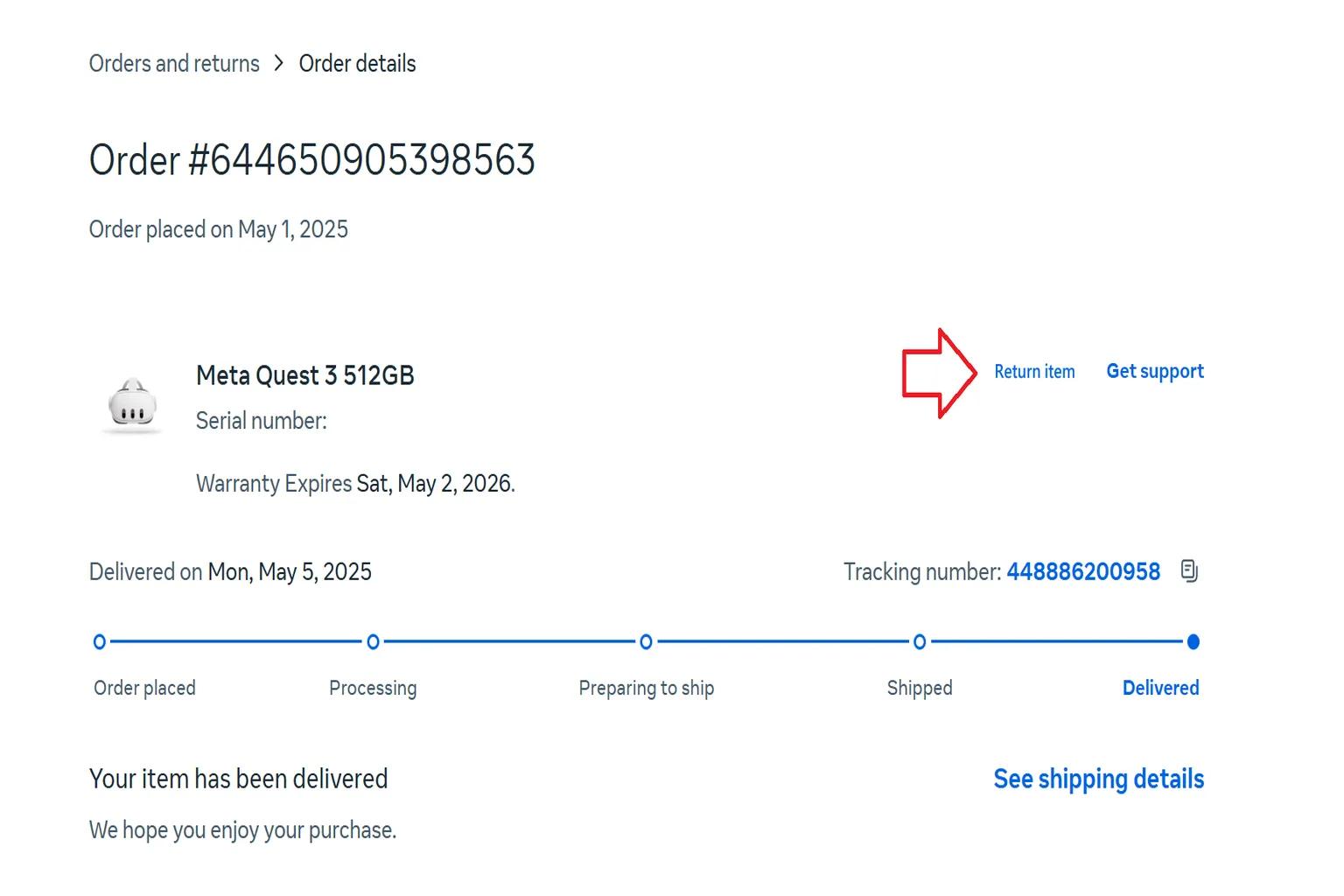
Step 2: Submit a return request.
In the section for the device you want to return, click Return item.
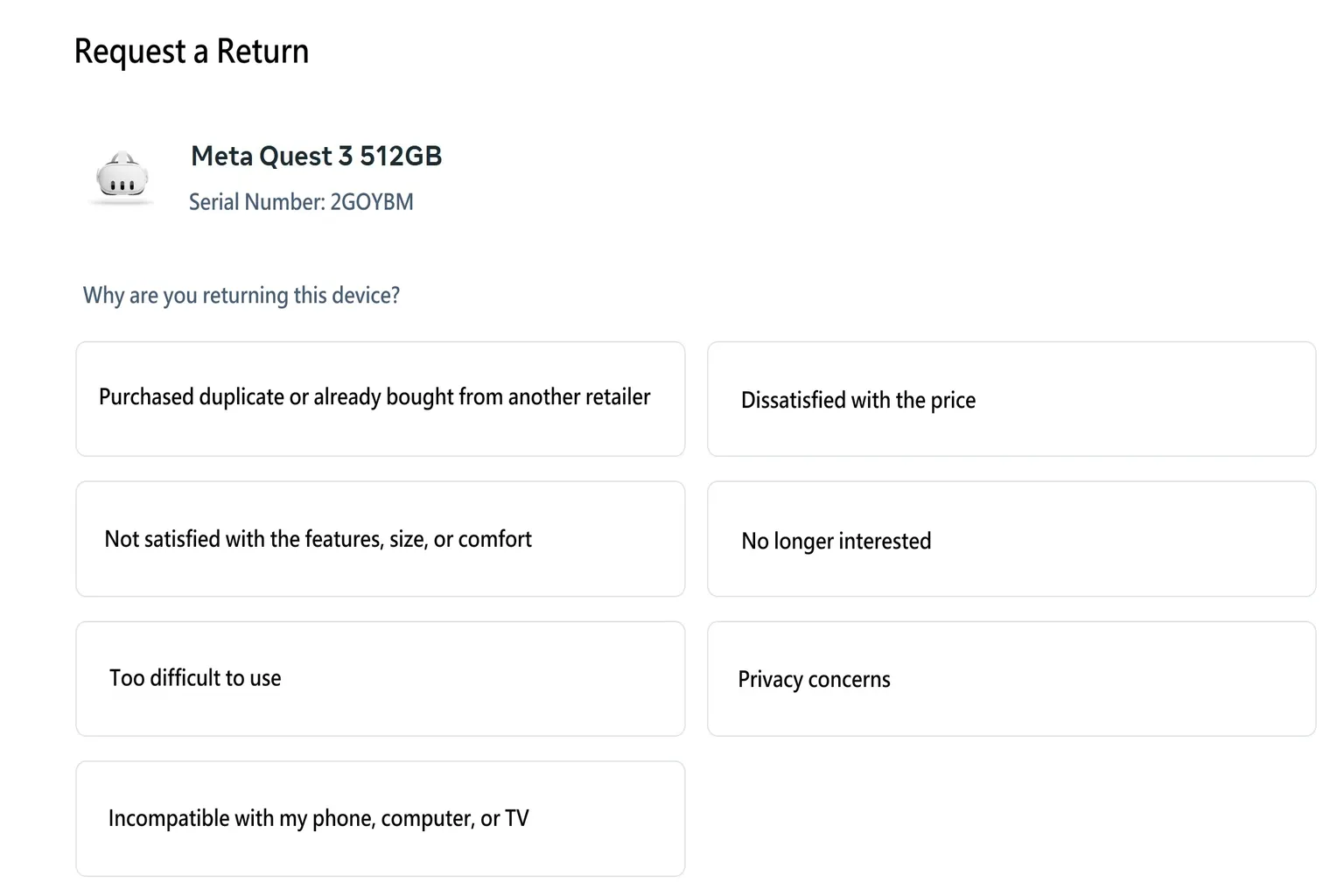
Step 3: Select a return reason.
Honestly, any option is fine. Meta is just collecting feedback on why people return products, so you don’t need to overthink it. Pick one and move on.
Step 4: Enter the return name and address.
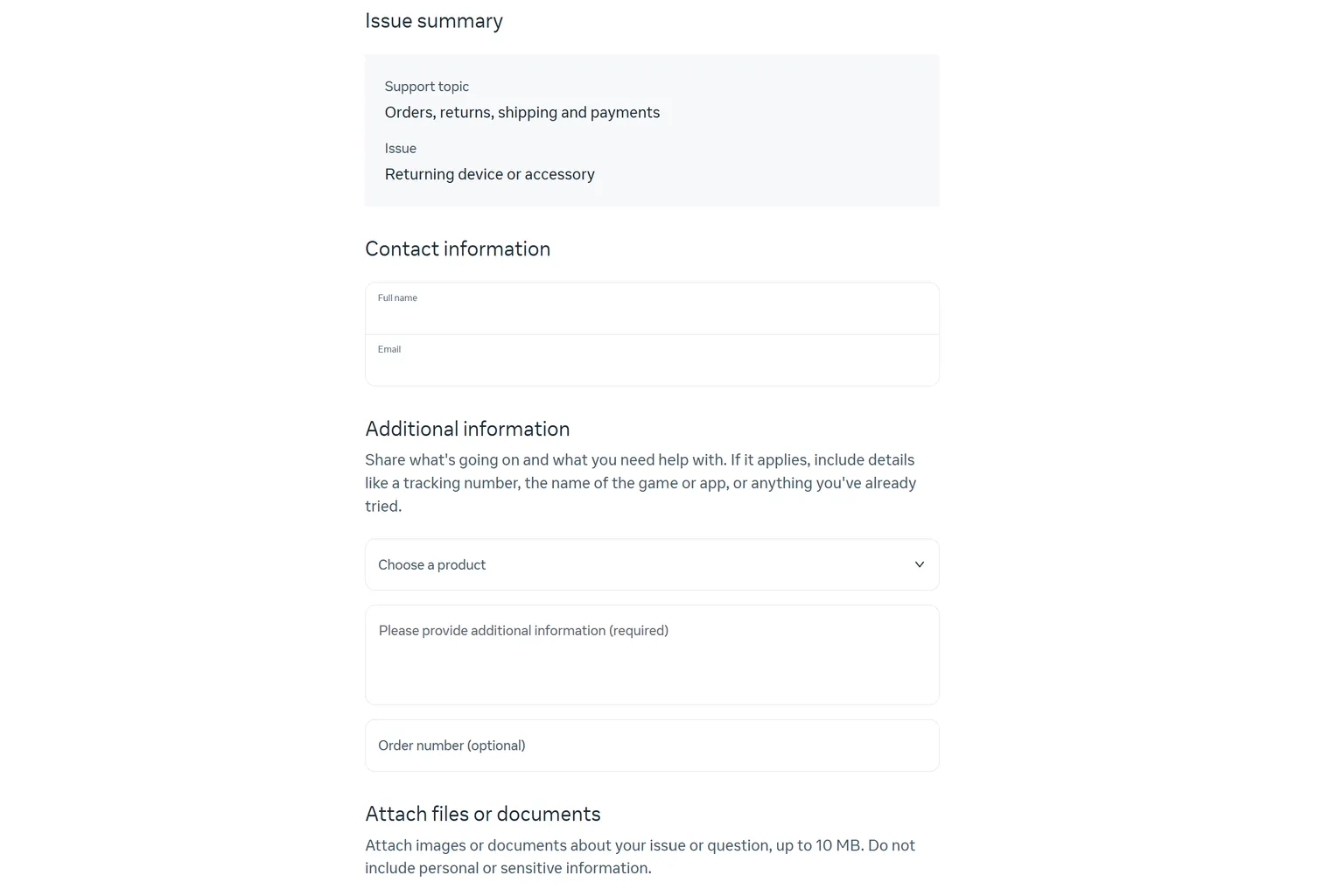
Enter your name, then fill in the return address. There’s no strict format requirement. It doesn’t have to match the address you used at purchase either, so you can enter any location that’s convenient for receiving shipments.
Step 5: Receive the return shipping label from Meta.
Around the next business day after you submit the return request, you’ll get an email from Meta. There’s really only one thing you need to do at that point: pack the Meta Quest headset securely and follow the instructions provided by Meta (pickup or drop-off, depending on region).
First, make sure the Meta Quest headset you’re returning is properly packed.
Then, follow the instructions provided by Meta. Depending on your region, you may be asked to hand the package to the courier for pickup or drop it off at a designated location. Once that’s done, the return process is complete.
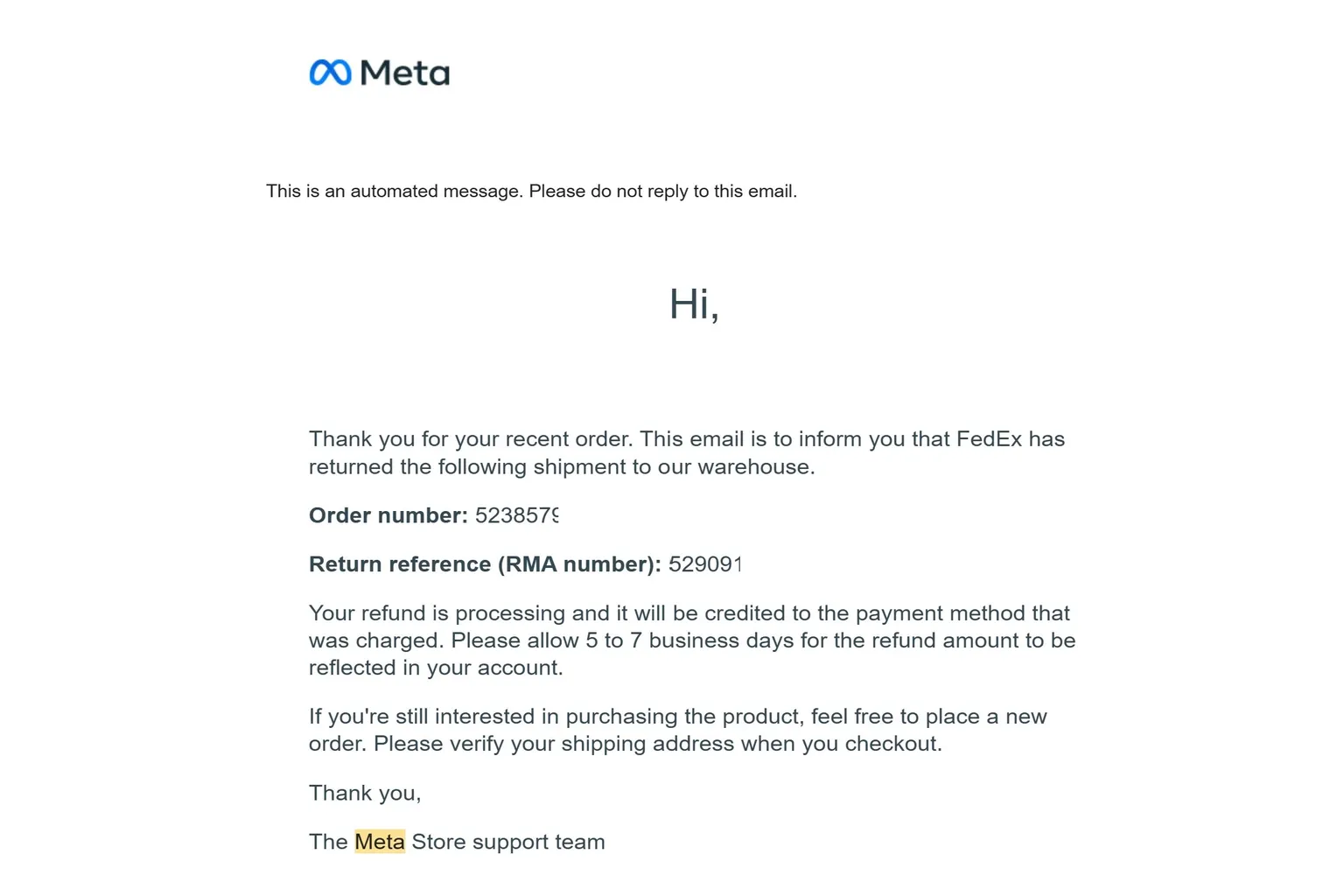
Step 6: Receive the refund confirmation email from Meta.
For domestic returns, the package usually reaches Meta about 3 to 5 days after shipping. Once it arrives, you’ll get an email confirming receipt within roughly 2 business days. After that, the refund is processed and credited back to your card within about 5 to 7 business days.
If you bought a Quest 3S but want to return it and upgrade to a Quest 3 instead, check out this purchase guide.
Meta Quest Game and App Refunds
Games and apps you buy from the store can also be refunded if they turn out to be “not what you expected.” Just keep in mind that there are clear rules.
- The purchase must be within 14 days.
- Total playtime must be under 2 hours.
- Consumable DLC, such as in-game currency or gems, is not refundable.
- Each game or app can only be refunded once.
As long as you stay within these limits, you can submit a refund request without much trouble.
Self-Service Refund from a PC
If you’re requesting a refund from a computer, start by going to the Meta Support page.
Step 1: Open the returns page
From the top of the Meta homepage, select Support, then open the Meta Quest and Quest Pro page.

Step 2: Get a game or app refund
Select Get refund for app or game.
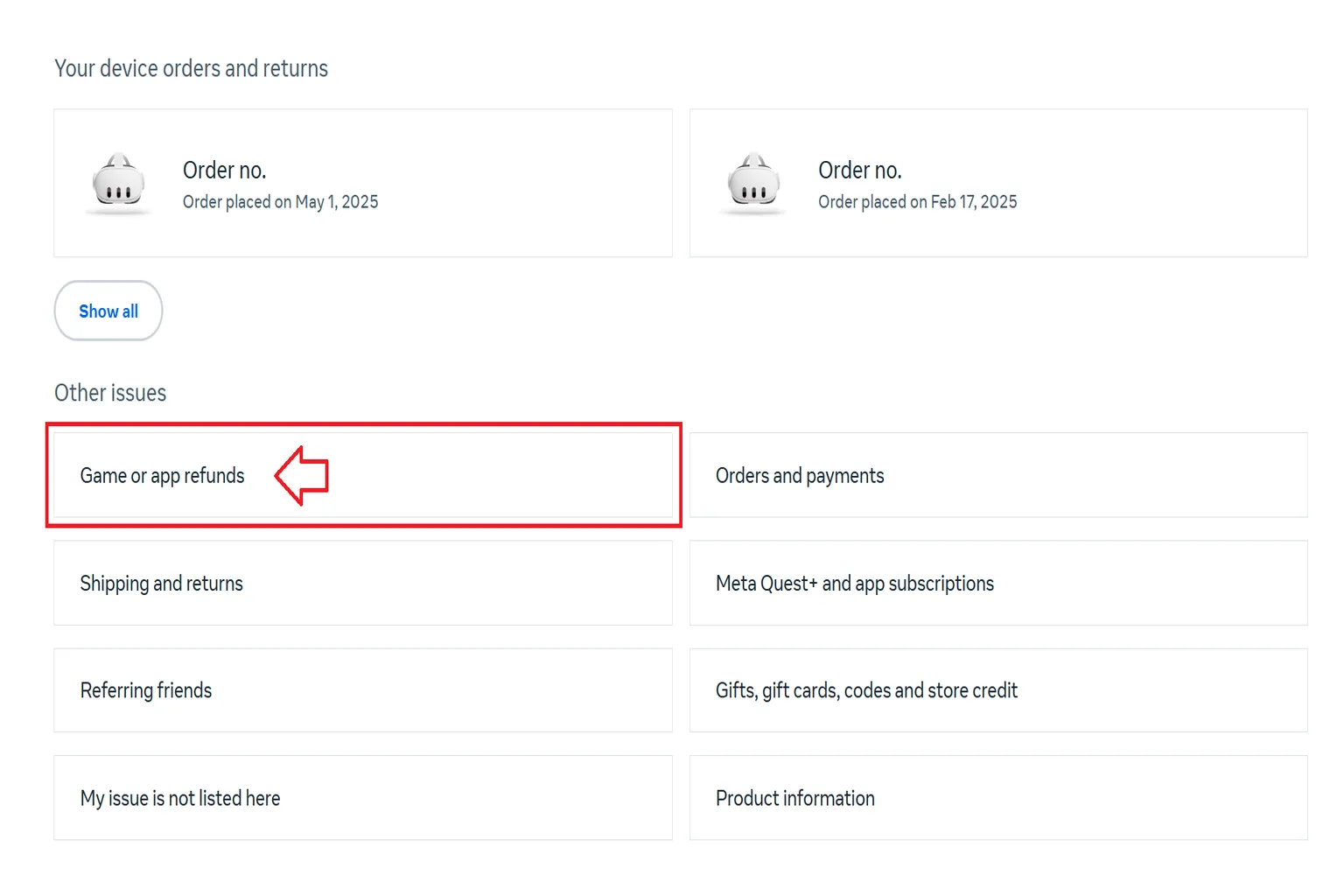
Step 3: Choose the game or app to refund.
Select the game or app you want to refund, then click Continue.

Step 4: Choose a refund method.
If you bought the game with a credit card, you can choose either a cash refund or a refund to Quest Cash in your Meta wallet.
Refunds to Quest Cash are applied immediately, while cash refunds usually take about 5 to 7 business days. If the purchase was originally made with Quest Cash, the refund will automatically be returned to Quest Cash.

Step 5: Select a refund reason.
Honestly, any option is fine. Meta is just asking why you’re requesting a refund for survey purposes, so you don’t need to think too hard about it. Pick one and move on.

Step 6: Submit the refund request.
After confirming the title you’re refunding and the selected reason, just click the submit button. That completes the refund request, and all that’s left is to wait for Meta to process it.

Step 7: Refund completed.
Once the refund is processed, the game is removed from your library immediately. If you see it disappear, that’s your sign the process finished successfully.

Self-Service Refund from a Mobile Phone
You can also request a refund using the Meta Horizon app, and the steps are even simpler this way. Here’s how it works.
Step 1: Open the control menu.
Tap the ☰ icon in the top corner of the screen to open the menu.
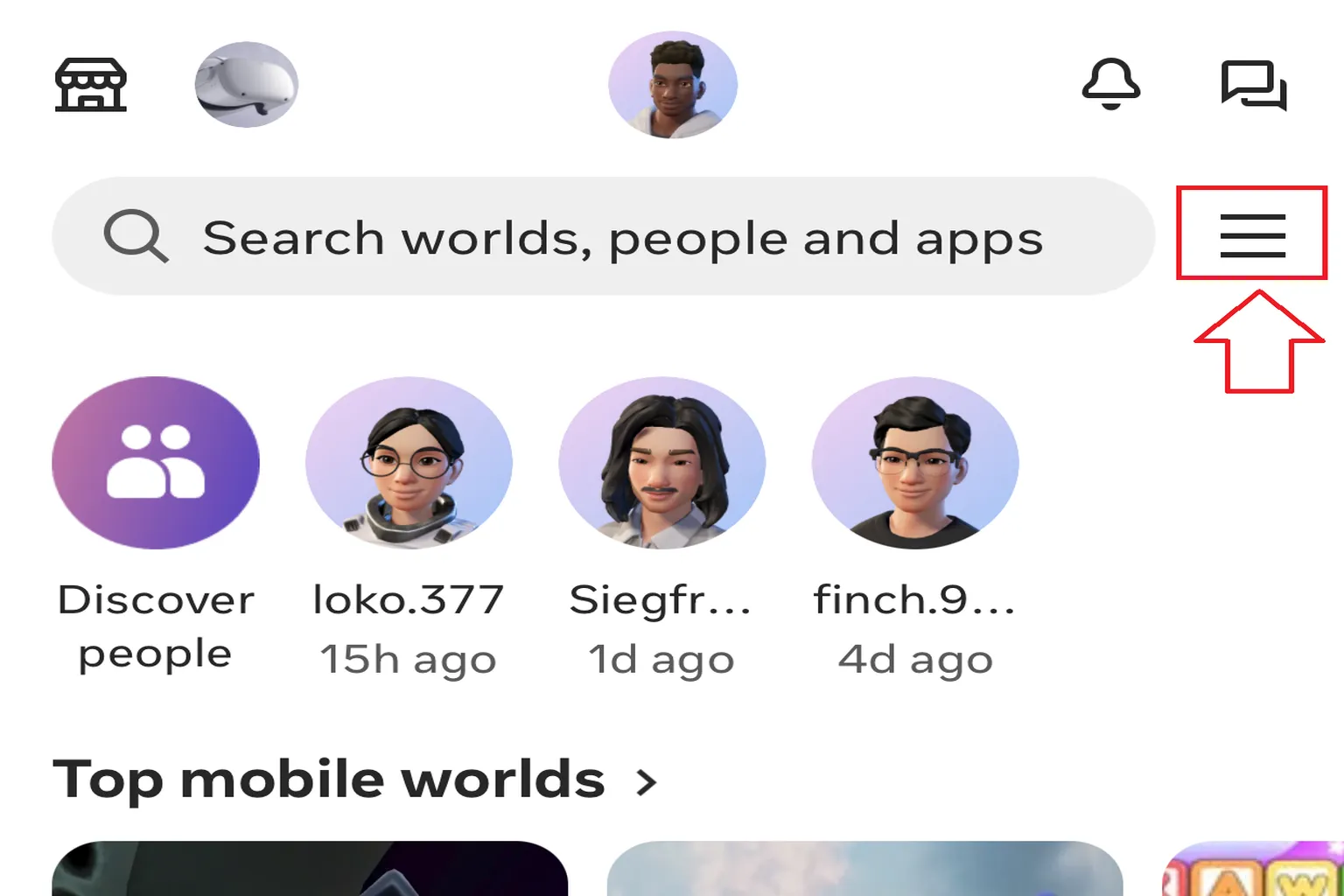
Step 2: Go to Purchase History.
Select Purchase History.

Step 3: Select the title you want to refund.
Tap the ︙ icon on the right side of the game and choose Request Refund.

Step 4: Choose a refund method.
If the purchase was made with a credit card, you can choose either a cash refund or a refund to Quest Cash in your Meta wallet. Refunds to Quest Cash are applied immediately, while cash refunds usually take about 5 to 7 business days. If the game was originally purchased with Quest Cash, the refund is automatically returned as Quest Cash.
Step 5: Select a refund reason.
Any option is fine. Meta is simply collecting refund feedback, so you don’t need to overthink it. Choose one and tap Request Refund.


Step 6: Confirm the refund.
Tap Request Refund to finish the process. The game disappears from your library immediately, so you’ll know right away that it’s done.

After you submit the request, refunds are usually completed within about 72 hours.
If the purchase was made with Quest Cash, the refund typically finishes within 2 to 3 minutes.

You’ll see “Refund Approved” in your purchase history. That means the process is complete, and the game has been removed from your library.
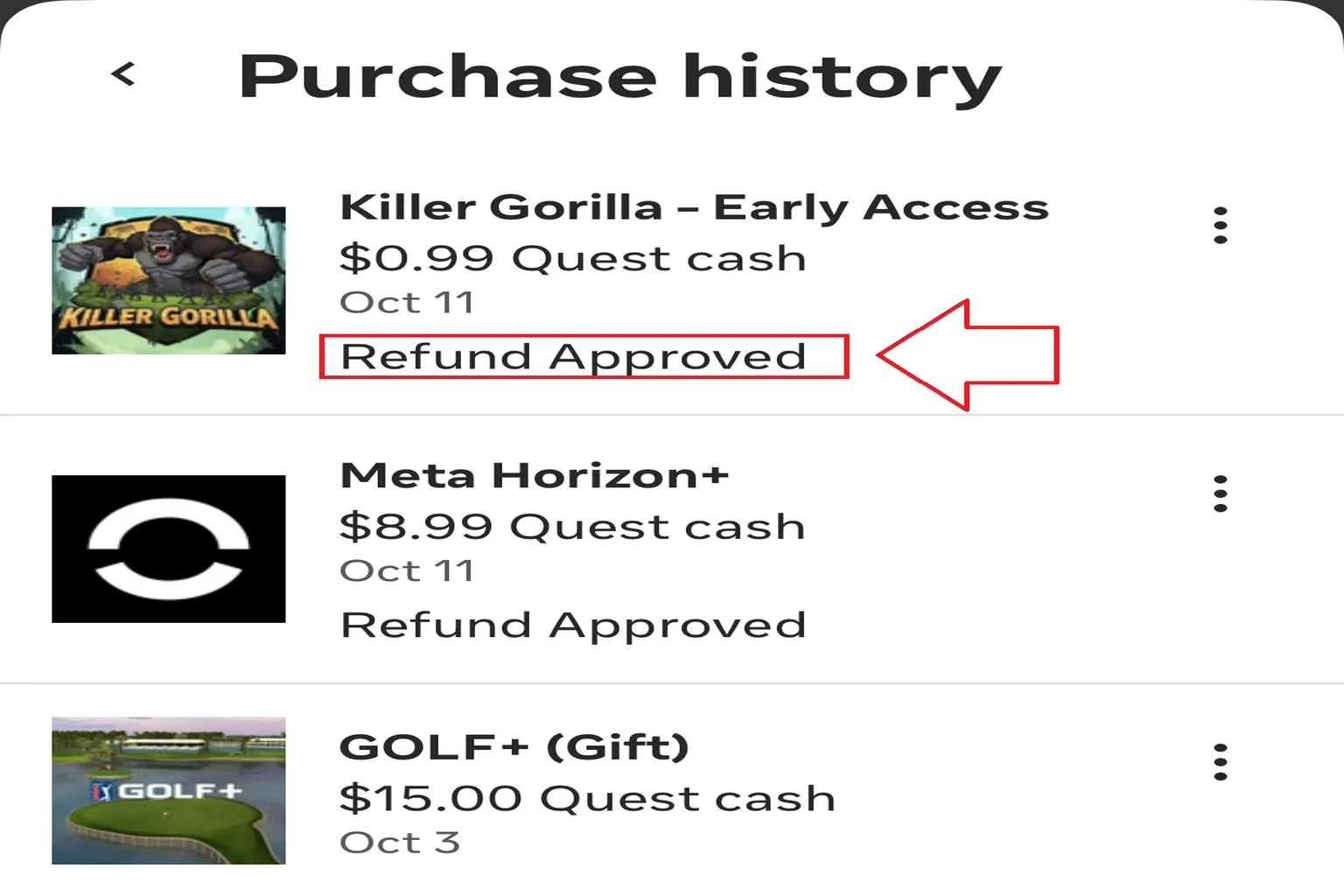
Cases Where Self-Service Refunds Aren’t Available
In the following situations, you can’t request a refund on your own.
- You gifted a game to a friend using the gift feature.
- More than 14 days have passed, or total playtime exceeds 2 hours, but there’s a special reason, such as the game not working at all.
- A system error occurred, or the content was never delivered after payment.
- You already refunded the title once and want to request another refund.
Because of this, even if you follow the steps above and reach Step 3, the refund button may not appear. In those cases, the refund has to be handled through Meta Support instead.
If you need to contact support, make sure you have the following information ready.
- Your Meta account email address
- Your Meta ID
- Your Meta nickname
- The game title
- Purchase date
- Order number
How to Check Your Meta ID and Nickname
Open the Meta Horizon app on your phone and look just below your avatar. The larger text is your nickname, and the smaller text underneath is your Meta ID.
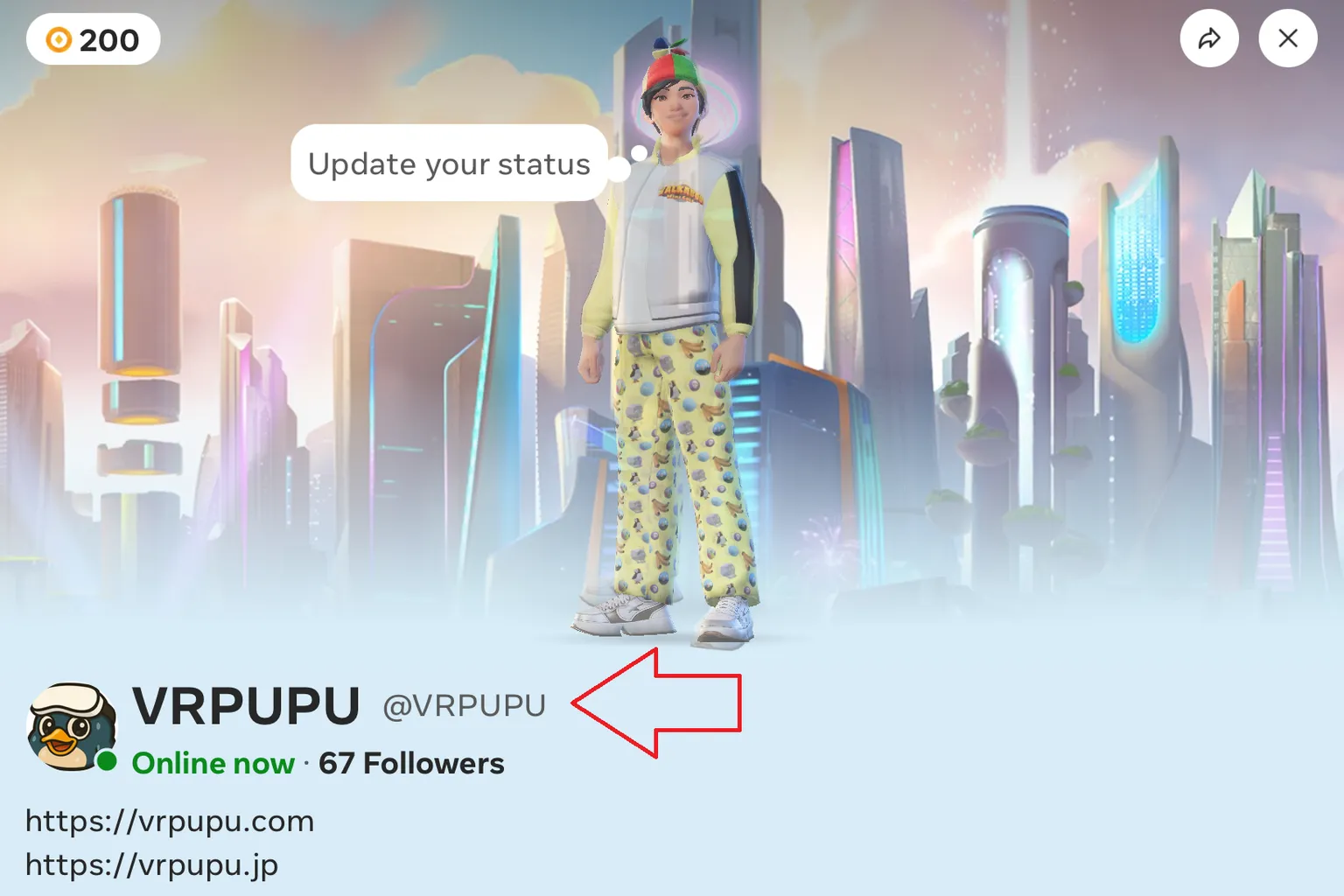
How to Find Your Order Number
Open the purchase confirmation email you received from Meta.
Inside the red box, the top section shows the purchase date and receipt number, and the bottom section shows the game title.
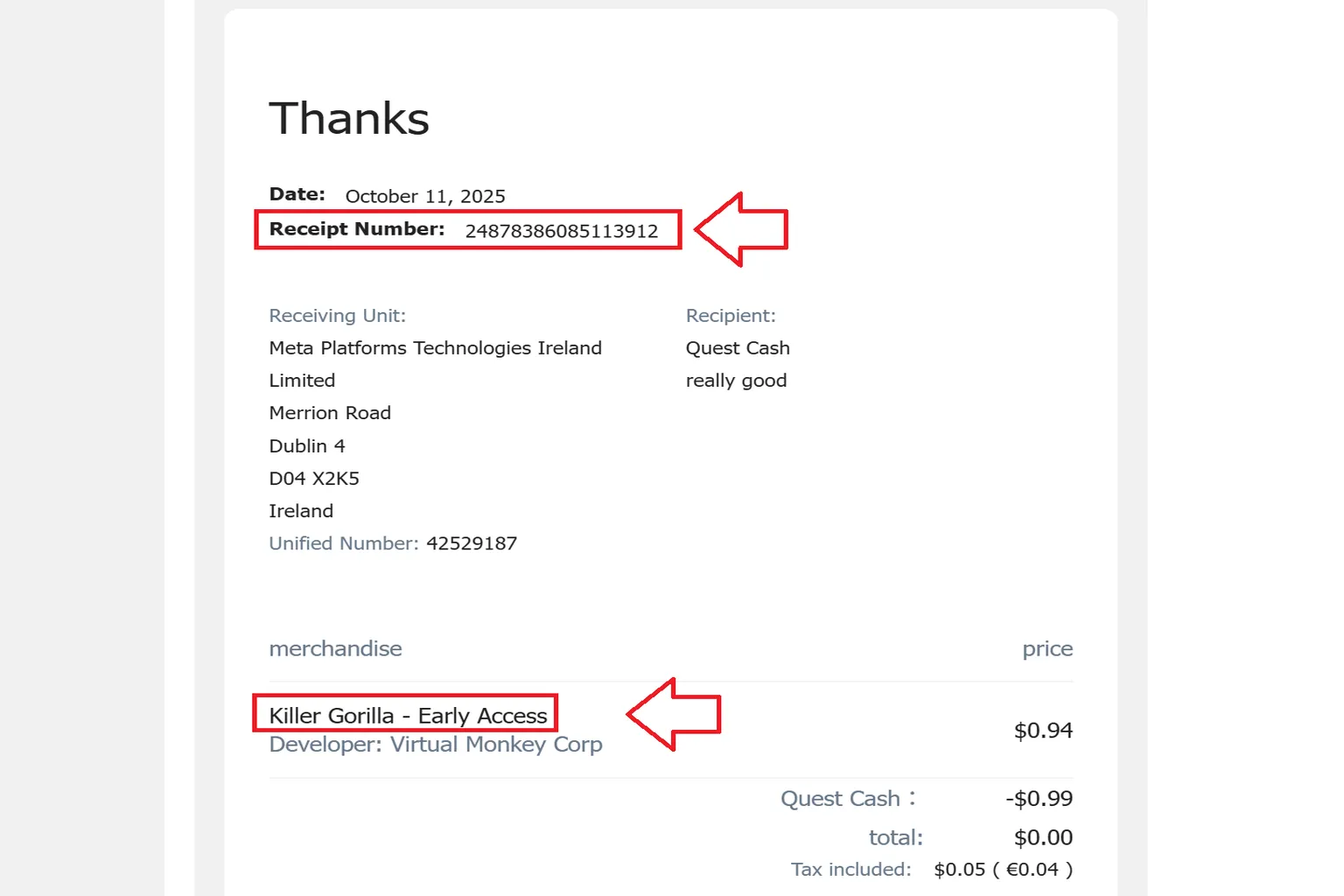
When you email Meta, you can write it like this.
Replace the bolded parts with your own information, and don’t copy and paste it word for word.
Hello, I purchased the following game and would like to request a refund.
My details are listed below.
Meta account email: [email protected]
Meta ID: Hi Meta
Nickname: Hi meta
Game title: Los Angeles Helicopter Flight – Hanging outside of the helicopter – VR Travel
Purchase date: May 23, 2025
Order number: 1437944847574346
You can check out the guide “Meta Quest Support Guide” for details on how to contact customer service. Usually, once you submit a request, the refund is processed within 2 to 24 hours.
Now that the software is refunded and the money is back in your pocket, why not look for another fun game to try? Here is a list of titles I have played myself that are both fun and low on motion sickness. Want to pick one from here?
Meta Quest Support Guide
Contact Live Chat & Fix Referral Issues
Meta Quest No-Motion-Sickness VR Games You Gotta Try
Safe Starter Picks for VR Newbies
FAQ – Common Questions
Can I return the headset if I already opened it?
Meta Official Store:
Yes. Even if the headset has been opened and used, Meta allows returns within 30 days.
Big-box electronics retailers:
Opened headsets are usually only accepted if they are in like-new condition, and some stores may refuse returns or charge a restocking fee.
Amazon:
Returns are allowed within the return window, but opened items may receive a partial refund depending on the condition and seller.
Meta says returns are allowed on the official site, but how do I actually do it?
After you submit a return request on the Meta website, you’ll receive an email with return instructions. Follow the steps provided by Meta to either schedule a courier pickup or drop off the package, depending on your location.
I only played for one hour, but it’s been more than 14 days since purchase. Can I still get a refund?
Normally, no. Refunds are not guaranteed after the return window. However, you can contact Meta Support and explain your situation. In some cases, refunds may be granted at their discretion, such as for technical issues, purchasing the wrong version, or severe motion sickness.
I received a game as a gift from a friend. Can I refund it myself?
Yes. You can request a refund from your own account, but the refund will be issued back to the original purchaser. The money will be returned to your friend’s Meta wallet or the payment method they used.
If I bought a game with Quest Cash, where does the refund go?
It goes back to your Quest Cash wallet. The refund is fast, usually within a few minutes, and you can use it to buy another game right away.
However, it can’t be converted back to cash or refunded to a credit card.
Do I need a receipt or proof of purchase when returning hardware bought from the Meta Store?
No receipt is required. As long as you use the same Meta account you used to purchase the device, the order history is already in the system.
The return shipping label itself serves as proof of the return, so no extra documents are needed.
Is refunding from a phone faster than using a PC? Is there any difference?
The functionality is basically the same, but the mobile app layout is simpler and easier to use.
Since Quest headsets are tightly linked to your phone anyway, refunds through the Meta Horizon app tend to be smoother. Honestly, using your phone is recommended.
What if I don’t receive the refund confirmation email from Meta?
First, check your spam or promotions folder. Gmail and Yahoo Mail sometimes misclassify these emails.
If you still don’t see it, log in to your Meta account and check the return status there.
If more than 3 days pass with no email, contact support directly.
Is it okay to choose any return reason on the Meta website? Will it affect future returns?
Meta generally doesn’t scrutinize return reasons very closely, so most choices go through without issue.
However, if you make a large number of returns in a short period, your account may be flagged and you could receive a warning email. It’s best to use returns only when necessary.
If a product from the official Meta Store arrives broken, should I choose return or replacement?
Choose a return and buy it again.
Based on a friend’s bad experience, replacements often arrive as refurbished units, without referral bonuses or bundled games. In the worst case, even controller pairing issues can happen. Returning and repurchasing is the safer option.