Did your Meta Quest referral bonus fail to show up, or is your headset in need of an urgent repair? Getting stuck in an endless loop of automated help articles can be frustrating. In this complete guide, we show you the fastest ways to reach a real person via WhatsApp or Live Chat. We also provide a pre-contact checklist so you have all the serial numbers and screenshots ready to secure your Quest Cash or warranty replacement in one go. Stop waiting days for email replies—master the Meta support flow and get back into VR today.
What should you do when something goes wrong with your Meta Quest?
When you buy a Meta Quest headset or start playing Meta games, you’ll occasionally run into odd issues. Things like a referral bonus not showing up, a headset breaking after the warranty expires and needing repair, or a purchase going through but not appearing in your account.
In general, Meta’s support team has a solid reputation for actually resolving user problems. That said, tougher cases, like an account suddenly getting locked, usually take more time and don’t get fixed instantly.
How to Contact Support on the Official Website
I’ve summarized the options below, so make sure you don’t end up going down the wrong path.
Email support
Best for simple issues or general questions. Many cases get resolved the same day or by the next day.
WhatsApp / online chat
Also for simple to general issues. Replies often come within 30 minutes, and support is live.
Official forum
Aimed at more complex problems. Whether it gets solved or not… honestly, it depends on your luck.
Issue Difficulty Guide
Simple issues: Game refunds.
General issues: Transferring bonus games from a headset purchase, reapplying for referral bonuses, requesting Quest device repairs, referral bonuses not showing up, wallet being locked.
Difficult issues: Unable to purchase games, account access problems, headset not powering on.
Support Request Flow
First, go to the official Meta website below and follow the steps in order.
Step 1: Select Support
On the official site, click Support in the top-right corner.

Step 2: Select Meta Quest
Choose Meta Quest devices and proceed to the support options.
If your issue is about AI Glasses or something else, just pick the option that matches your case.

Step 3: Choose Customer Service
Pay attention here. If you pick the community forum, most issues honestly don’t get resolved.
Choose Get Support instead, so you’re actually talking to customer service.

Step 4: Choose the Issue Category
Here, just pick the option that matches the problem you’re dealing with.
In most cases, Orders, Returns, Shipping, and Payments is the category you’ll use the most.

Step 5: Choose a Support Option
There are three ways to contact support here:
Email us
Best if you don’t need it fixed right away. Send an email to Meta and you’ll usually hear back within 6–24 hours.
Chat with customer support
Good when you’re on a computer and want live help. This option only shows up on the U.S. site, not the Chinese or Japanese pages. One thing to watch out for: if you close the page or leave it idle too long, the chat can disconnect.
Chat via WhatsApp
Best choice on a phone. You can talk in real time without worrying about the session dropping, even if you switch apps or lock the screen.

Step 6: Fill Out the Issue Summary
Enter your name, email address, and a short description of the problem you’re dealing with right now.
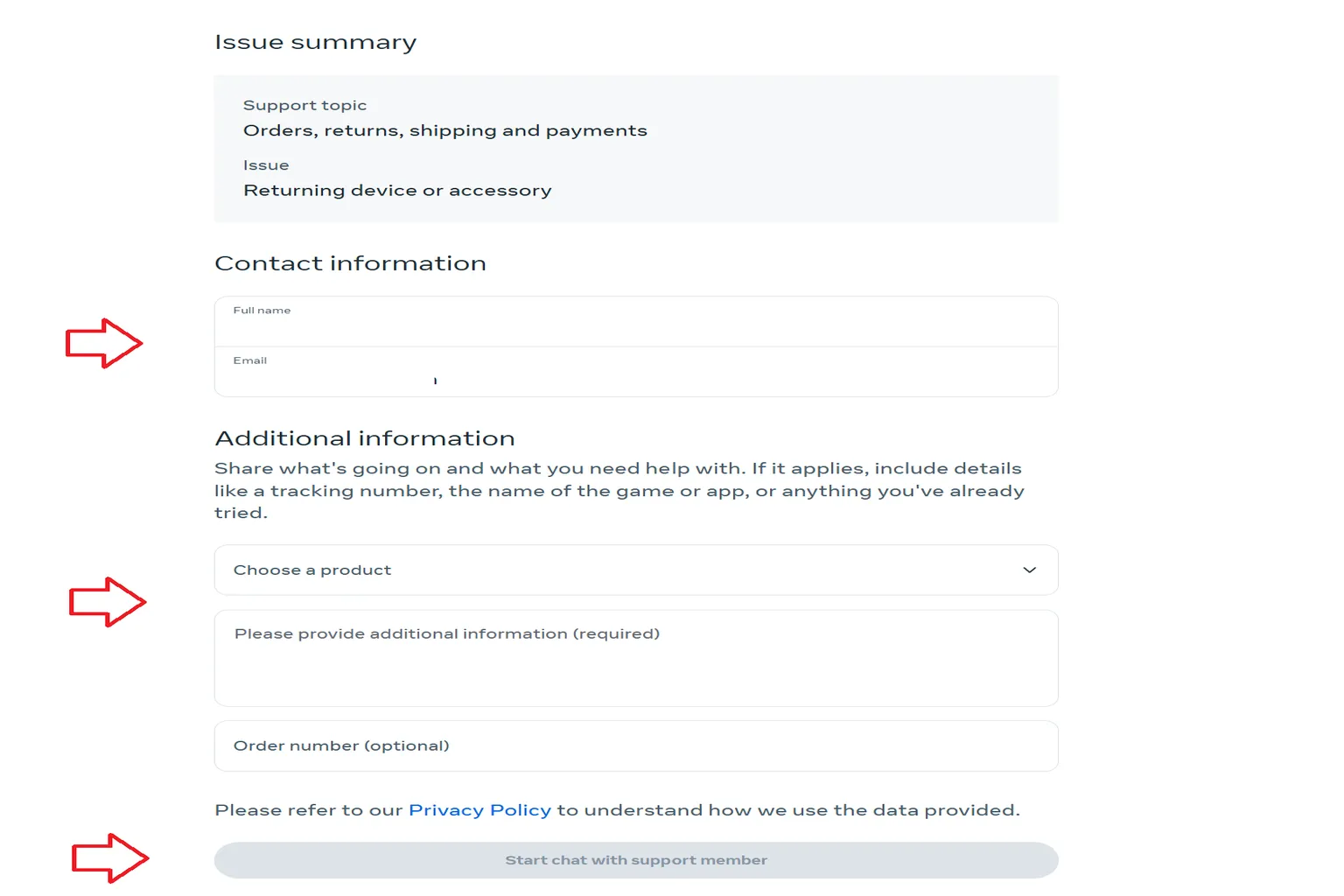
After filling out the form, you can move on to start the online chat.

In simple terms, if it’s a problem that can be solved with money, support is usually pretty good at handling it.
A common example is “I used a referral code, but the bonus never showed up.” In that case, as long as you provide the headset serial number, both Meta accounts involved, email addresses, and a screenshot that proves the referral, support will usually approve the compensation without much trouble.
Another example is wanting to transfer the bonus game that came with a new Quest 3 or 3S to a friend. In many cases, a single email to support is enough to get it sorted out.
On the other hand, issues that don’t involve money, like not being able to enter an address, shipping taking forever, or an order getting canceled without a clear reason, often get very generic replies. Most of the time, it ends with something like “we’re looking into it,” and that’s where it stops.
Support Contact Prep Checklist
When you reach out to Meta support, don’t go in empty-handed.
If you contact them without the right info, you’ll end up stuck in email back-and-forth for days.
Below, I’ve listed what you should prepare for the most common cases.
No matter what the issue is, support will always ask for these basic details first:
- Meta account
- Meta email address
- Meta Horizon username
For simple to general issues, these are the extra details support usually asks for, depending on the case.
Game refund
sgame title, purchase date, receipt number.
Referral bonus reapplication
headset serial number, referrer’s Meta account, email address, referral date, and a screenshot that proves the referral.
Bonus game transfer
Quest Cash balance for both you and the other person, the other person’s Meta account, and email address.
Quest device repair requests
order number from the official Meta store, the name of the faulty part, serial number, reason for the failure, and whether there was water damage or a drop. If you bought the device from Amazon, Walmart or a similar retailer, the official store order number is not required.
High-difficulty issues tend to get complicated fast and take a long time to resolve.
A common one is when your account suddenly can’t buy games anymore, and gifting to friends stops working at the same time.
When you try to make a purchase, you’ll usually see an error like this:
Request Not Completed – We noticed something unusual and, for your security, this request couldn’t be completed. Please try again later, or visit our Help Center.
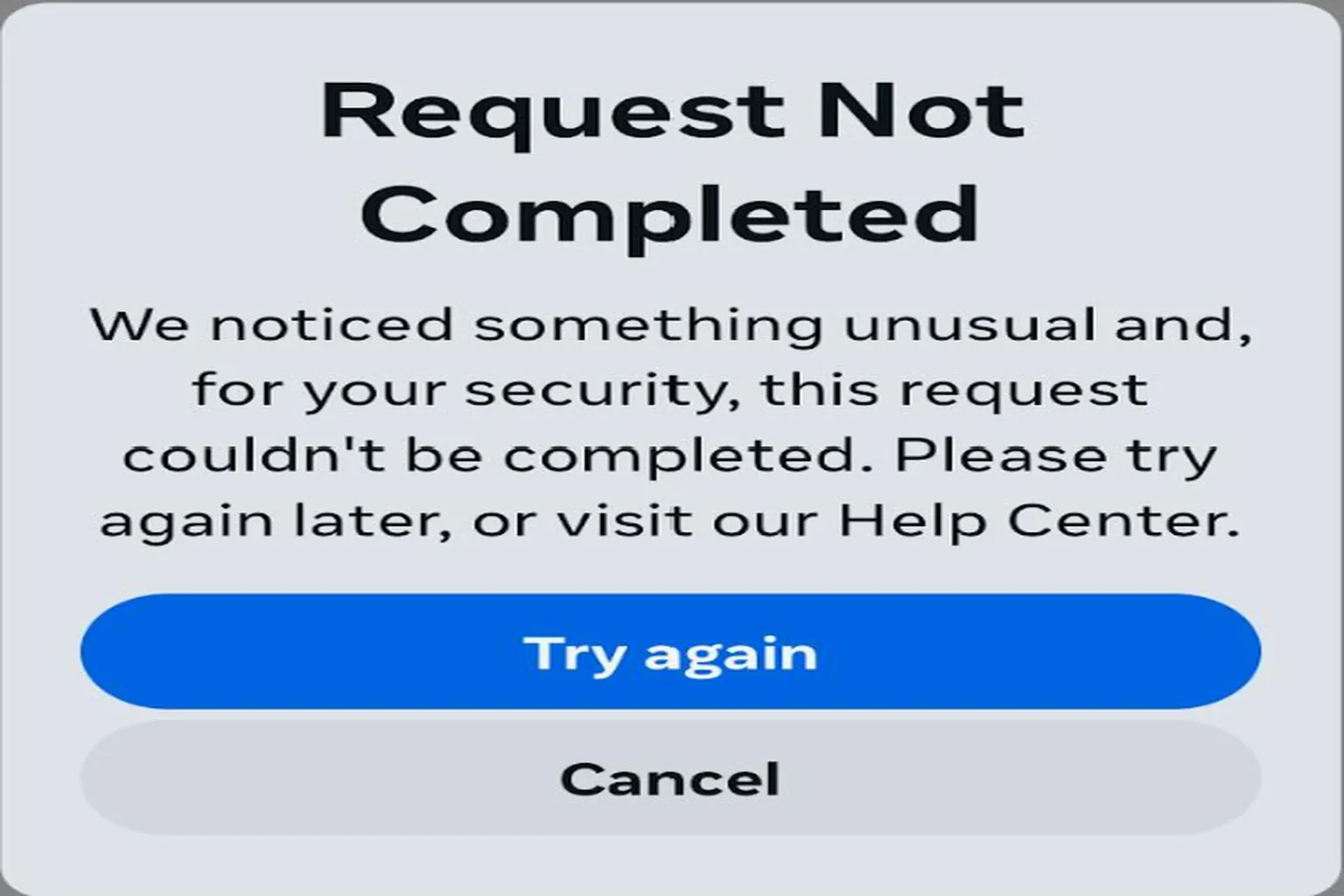
If you run into this kind of difficult issue, check out this guide. It explains how to restore your account’s ability to make purchases.
FAQ – Common Questions
I already sent an email to support. What should I do next?
With email support in English, the agent often changes, and it’s easy to lose track of what’s going on. In that case, it’s usually faster to open WhatsApp directly and contact support there instead.
I heard hard problems can be solved on the official forum. How does that work?
Start by posting something like “Help!” on the official forum. If you’re lucky, you’ll be told to DM an admin, and that admin may take over your case.
Does it depend on which support agent you get?
It really comes down to luck. Meta support can vary a lot. Sometimes your issue gets fixed in one shot, other times it takes several back-and-forth emails before anything actually gets resolved.