Did you power on your new Meta Quest 3 or 3S only to realize your $30 referral bonus is completely missing? Do not panic. If you are within your first two weeks of activation, you can still recover your free Quest Cash using a simple factory reset trick. In this complete troubleshooting guide, we walk you through the exact step-by-step process to wipe your headset, safely reapply a valid referral link, and claim your money in under five minutes. Missed the two-week window? We also provide proven copy-and-paste email templates to help you successfully navigate Meta Support. Stop leaving free money on the table—follow our recovery roadmap to fix your account and start downloading games today.
How to recover the purchase bonus
Why didn’t I get the $30 referral bonus on my Meta Quest 3?
These are the most common reasons:
- You clicked the referral bonus at the time, but it didn’t apply correctly → Recovery possible
- You successfully clicked the referral bonus, then clicked it again and the system canceled it → Recovery possible
- The player who referred you sold their headset, and the system revoked the referral eligibility → Recovery possible
- Your account was under 18, so Meta didn’t issue the bonus → Recovery possible
- The headset was used or an official refurbished unit and had already received the bonus → Not recoverable, no bonus
If your situation matches any of points 1 to 4 and it’s still within two weeks of activation, you’re not too late.
You can recover the $30 bonus in about five minutes.
If more than two weeks have passed, you’ll need to contact Meta support and request a referral bonus recovery.
If you want help, you can also ask in the comments and I’ll walk you through it.
How to recover the $30 referral bonus (within two weeks of activation)
A quick tip: there’s another workaround. You can create a new account, accept the referral again, receive the $30 bonus, then use that bonus to buy games and gift them to your original account.
First, reset the headset. Don’t worry—any games you bought from the Meta Store can be re-downloaded from your game library after the reset.
Things to prepare before resetting:
- Make sure Meta Horizon is installed on your phone and you’re logged into your account
- Turn on Bluetooth on your phone
The headset reset process is as follows:
Step 1: Open settings
Open the Meta Horizon app, tap the ☰ icon in the Top-left corner, and go into settings.

Step 2: Go to Devices
In the device management section, tap Devices.

Step 3: Open headset settings
Under Manage your devices, select Headset Settings.

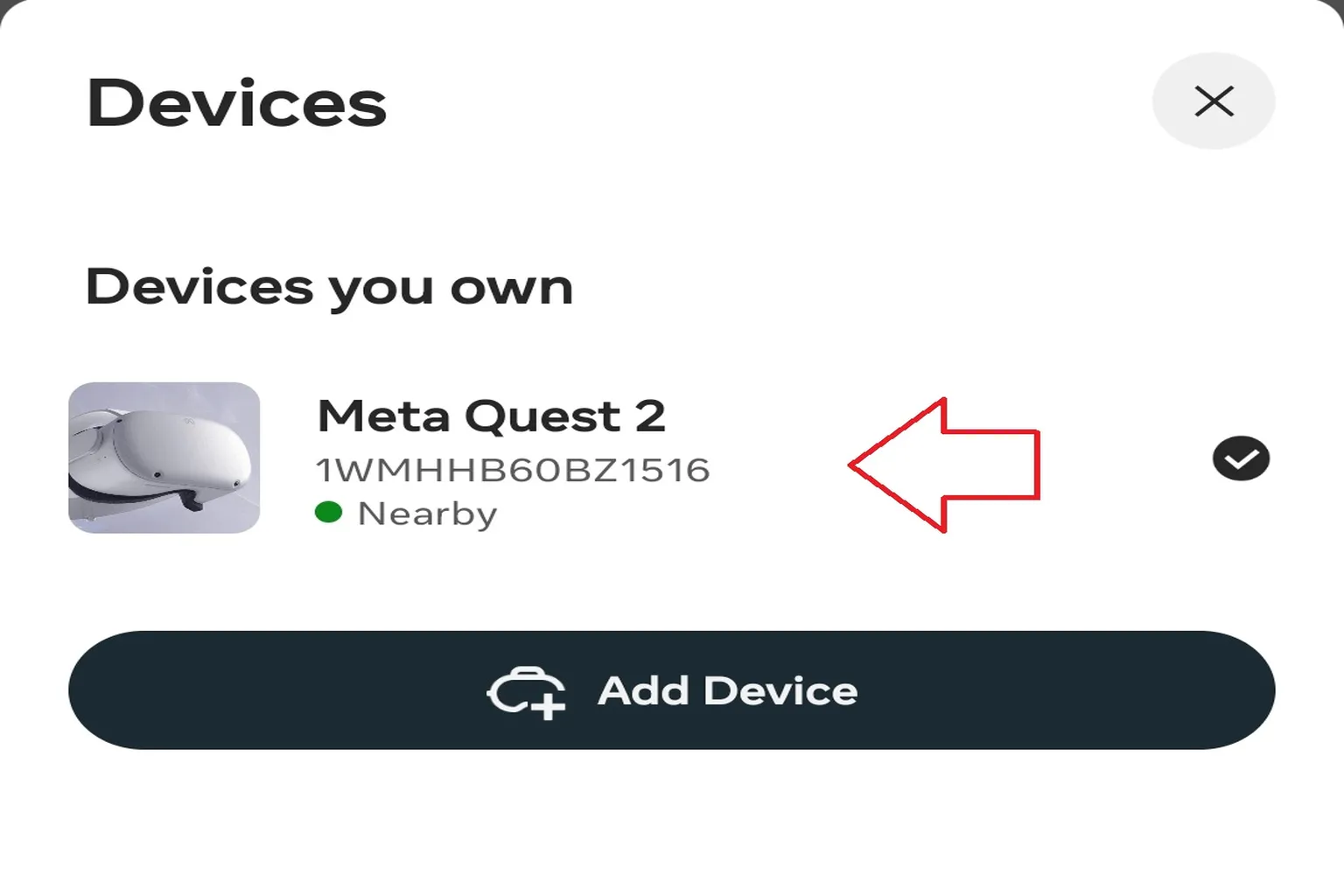
Step 4: Select your Quest
Choose your Meta Quest headset. Make sure the headset is nearby and powered on to continue.
Step 5: Open advanced settings
In the headset settings, select Advanced Settings to enter the reset section.

Step 6: Factory reset
Scroll to the bottom and choose Factory Reset. Once you tap it, the headset will restart and return to a like-new state.

Preparing to reapply for the bonus (reset via the Meta Horizon app)
Step 1: Create a new account and re-claim the $30 Meta referral bonus
Tap the referral code link and register a new Meta account using a new email address.
Below is the latest referral code—feel free to use it.
(If you’re not sure whether it applied correctly, feel free to email me. VRPUPU can help check your referral status on the official site.)
Step 2: Link the headset with the new account and confirm the bonus
Log in to the Meta Horizon app with the new account and connect the headset. Once it’s linked, the $30 bonus will appear in your wallet and can be used to buy games.
Step 3: Use the bonus to buy games and gift them to your original account
When purchasing a game, choose Gift. Meta will send the game code to the specified email address or directly to a friend.
Step 4: Reset the headset and switch back to your original account
Run Factory Reset again to return the headset to its original state.
Step 5: Reconnect the headset and use it as usual
Log back into the Meta Horizon app with your original account and reconnect the headset. That’s it. The bonus recovery can be finished in about five minutes.
How to recover the bonus if more than two weeks have passed since activation
In this case, your only option is to contact official Meta support.
Whether it works can depend on the support agent you get, but if the headset hasn’t received the bonus yet, there’s still a chance.
Reach out to support and try to recover the bonus through the conversation.
If you’re not sure how to find Meta support, take a look at the support guide article for step-by-step instructions.
What to prepare before contacting Meta support
- Your Meta ID
- Your Meta account email address
- Your headset serial number
- The Meta ID of the person who referred you
- The Meta account email address of the person who referred you
- A screenshot showing proof of the referral link you received
Use the information below as a reference when contacting support.
If you meet the requirements, Meta can issue the bonus for you.
Note: Replace the bolded sections with your own information before sending.
Hello,
I recently purchased a Meta Quest headset, but I did not receive the $30 referral bonus after activating the device.
Could you please help apply the referral bonus for both me and my friend? Our details are below:
My Meta ID: Hi Meta
My Meta account email: [email protected]
Headset serial number: 1321357431
Referrer’s Meta ID: Hi Meta 2
Referrer’s Meta account email: Hi Meta [email protected]
Referral proof: Screenshot showing the referral link being sent
First activation date of the headset: May 1, 2025
Thank you very much for your help.
Best regards,
If you have all the required information ready and happen to get a support agent in a good mood that day, contacting support via WhatsApp often gets the bonus applied within 30 to 60 minutes.
If you use email instead, it usually takes 1–2 days.
When contacting support, keep your tone polite and make it clear that you’re a loyal Meta user. That noticeably improves your chances.
For example, you can say something like:
“I’m really enjoying using Meta products, and this bonus is very important to me. I’d truly appreciate your help.”
That kind of wording tends to increase the likelihood of a successful recovery.
One small tip: Meta’s support can vary a lot depending on the agent.
Some are very helpful, while others may respond slowly or be less flexible.
If you run into the latter, try contacting support again at a different time.
What should you do after recovering the $30 bonus?
Once you receive the referral bonus, you can jump straight into the Meta Store and start browsing games.
And this is the part that really matters.
Even if a game isn’t on sale, entering “VRPUPU” before checkout gives you 10% off.
Some DLCs and bundles can also get discounted at the same time.
When you think about it, the savings are often enough to grab one or two extra games, which makes a big difference.
So what’s next? Simple.
Start playing some great Meta Quest VR games.
The five titles I introduce here are easy to play and less likely to cause motion sickness. They’re some of my personal favorites.
Give them a try and see which ones hook you first.
FAQ – Common Questions
I bought a used headset, but I don’t know if the previous owner already received the bonus. How can I check?
Just try the recovery steps once.
If the bonus was already claimed, Meta support will be able to confirm that and let you know.
If more than two weeks have passed since activation, is the process complicated?
As long as you prepare the required information the way I explained earlier, it’s not too bad.
By email, it usually takes about two days. If you use WhatsApp, it’s often handled the same day.
I bought a brand-new headset, but I’m worried that if I don’t get the bonus after activation, I’ll have to go through all this again. Is there a way to avoid that?
Read the “Meta Quest 3 & 3S Referral Guide: How to Claim Your $30 Bonus” on this site.
It explains the steps and checks in detail, so you can make sure you get the bonus correctly on the first try.
At first, I activated the headset using a random referral code I found online, didn’t get the bonus, and now I don’t know who to ask for help. What should I do?
Using a new account to receive the bonus is basically the same as getting referred again.
You can ask a new friend for a referral, or send me a message and I’ll help you out.