

Meta Quest and Meta AI glasses may both go on your face, but they’re built for completely different jobs. From Ray-Ban Meta to Meta Ray-Ban Display, here’s how Meta’s AI glasses differ from Quest—and why adding a display still doesn’t make them a smaller VR headset.
What’s the Difference Between Meta Quest and Meta AI Glasses?
I’ve been using Meta Quest for a while, and when Meta started seriously pushing its AI glasses, my first thought was:
Is Meta finally shrinking Quest down to the size of a normal pair of glasses?
But that’s not really what happened. We may not see something closer to that until Project Phoenix, Meta’s rumored next-generation VR/MR headset, possibly arrives in 2027.
Meta Quest and Meta AI glasses may both go on your head, but that’s about where the similarity ends.
This is how I think about it.
Meta Quest drops you into a whole other world in VR. Once you’re there, you become the adventurer or the hero.
Meta AI glasses are different. They’re more like having the Pharaoh from Yu-Gi-Oh! with you in the real world—a knowledgeable companion who stays by your side and helps out whenever you run into something you don’t understand or need an answer to.
Thinking about it this way makes the difference a little easier to understand, right?
Meta Quest Is a Computer You Wear on Your Face
VRPUPU is full of guides on how to use and play with Quest, so I think most readers here are already pretty familiar with it.
When you put on a Quest, the displays sit right in front of your eyes.
Once you start playing in VR, the living room you were standing in a moment ago disappears. The next thing you know, there might be a ping-pong table in front of you, you might be standing on a stage, or sometimes you might find yourself right in the middle of a battlefield.

Quest 3 and Quest 3S made things even easier to use by adding full-color passthrough.
You can see your room even while you’re playing, and you can place virtual objects right into your real-world space.
So now it’s not just VR. Quest also has MR features.
You can even play Angry Birds right in your own room.

You can even have an intense shootout with a horde of zombies right in your living room.

But the basic idea hasn’t changed.
Quest puts a virtual world right in front of your eyes and takes you into it.
It’s a little heavy, and you’ll probably work up a sweat if you wear it for a long time, but it’s still incredibly useful for gaming, watching videos, and working out.
It’s just not something you’re going to keep on your face all day. I don’t think many people can wear one for more than four hours straight.
Meta Quest even has Travel Mode now, so you can use it on a plane or train.
And if you really don’t care what people around you think, technically you could even walk around outside wearing it. If you can handle the attention, anyway.
I’ve actually seen a few videos of people riding the subway or going shopping with a Quest still on their face.
But to everyone around them, it probably looks more like this:
Wait, is this Midgar?
Why is a Shinra soldier patrolling the streets?!

At that point, it’s not really about whether you can handle the embarrassment.
Quest is heavy, bulky, and just isn’t designed to work like a normal pair of glasses in the first place.
Travel Mode is there so you can use Quest on a plane. It’s not meant to turn Quest into something you wear while walking around a department store.
So when Meta started building AI glasses, it didn’t just try to shrink Quest down. It changed the whole idea behind the product.
Meta AI Glasses: What If You Just Leave Out the Display?
The first time a Quest player sees something like Ray-Ban Meta, the reaction is probably pretty simple:
There’s no display!
So what are you supposed to do with it?
Even after you put them on, there’s no menu floating in front of your eyes and no text appearing in your field of view. They definitely aren’t going to tell you that the guy standing next to you has a power level of 5.
They look and feel almost exactly like a normal pair of glasses.
The difference is that inside those ordinary-looking glasses are cameras, microphones, and speakers, with Meta AI connected to all of it.

The closest comparison I can think of is a knowledgeable spirit who’s always at your side.
Something like the Pharaoh from Yu-Gi-Oh!
He’s not constantly stepping in. But when Yugi runs into trouble or needs some guidance, the Pharaoh is right there with him, helping him figure out what to do.
Of course, Meta AI isn’t going to ask you to solve the Millennium Puzzle or send you into a duel against someone with three Blue-Eyes White Dragons.
But in terms of the role it plays, the comparison is actually pretty close.
For example, if you spot a beautiful building in the distance, you can just look at it and ask, “What’s that?”
If you’re traveling overseas and can’t read a sign or a menu, you can simply ask about it.
Before, you would have pulled out your phone. With these glasses, you can just ask about whatever you’re already looking at. That convenience is actually pretty interesting.
Say you’re traveling in Japan with a girl you like, and you take her to a nice Japanese restaurant.
You both sit down, and the server brings over a menu that’s entirely in Japanese.
No English translation. You have absolutely no idea what any of it says.
Normally, you’d pull out your phone, take a picture of the menu, send it to ChatGPT, and ask:
“What does this say?”
At that point, she immediately knows you can’t read Japanese.
But if you’re wearing Meta AI glasses, you can keep looking at the menu and quietly ask:
“Hey Meta, what dish is this?”
The camera sees what you’re looking at, and Meta AI tells you what the dish is.
Then you just order like nothing happened—and maybe even explain the dish to her while you’re at it.
Technically, all you’ve removed is a few steps:
“Take out your phone → take a photo → send the image to AI.”
But don’t underestimate those few seconds.
When you’re out to dinner with a girl, there’s a pretty big difference between:
“Oh, he’s looking up the menu on his phone.”
and:
“How does this guy know everything?”
Maybe that’s enough to push your rep straight to Exalted.
Meta Finally Puts a Display in Its AI Glasses
Before Meta Ray-Ban Display, Meta’s AI glasses didn’t have a display.
If you wanted to know something, it was like having the Pharaoh from Yu-Gi-Oh! beside you, answering in your ear.
But in 2025, Meta announced the Meta Ray-Ban Display.
This time, the word Display is right there in the name.
So that means we finally get a screen, right?
I can secretly watch Netflix during a meeting or scroll through Facebook without anyone noticing, right?
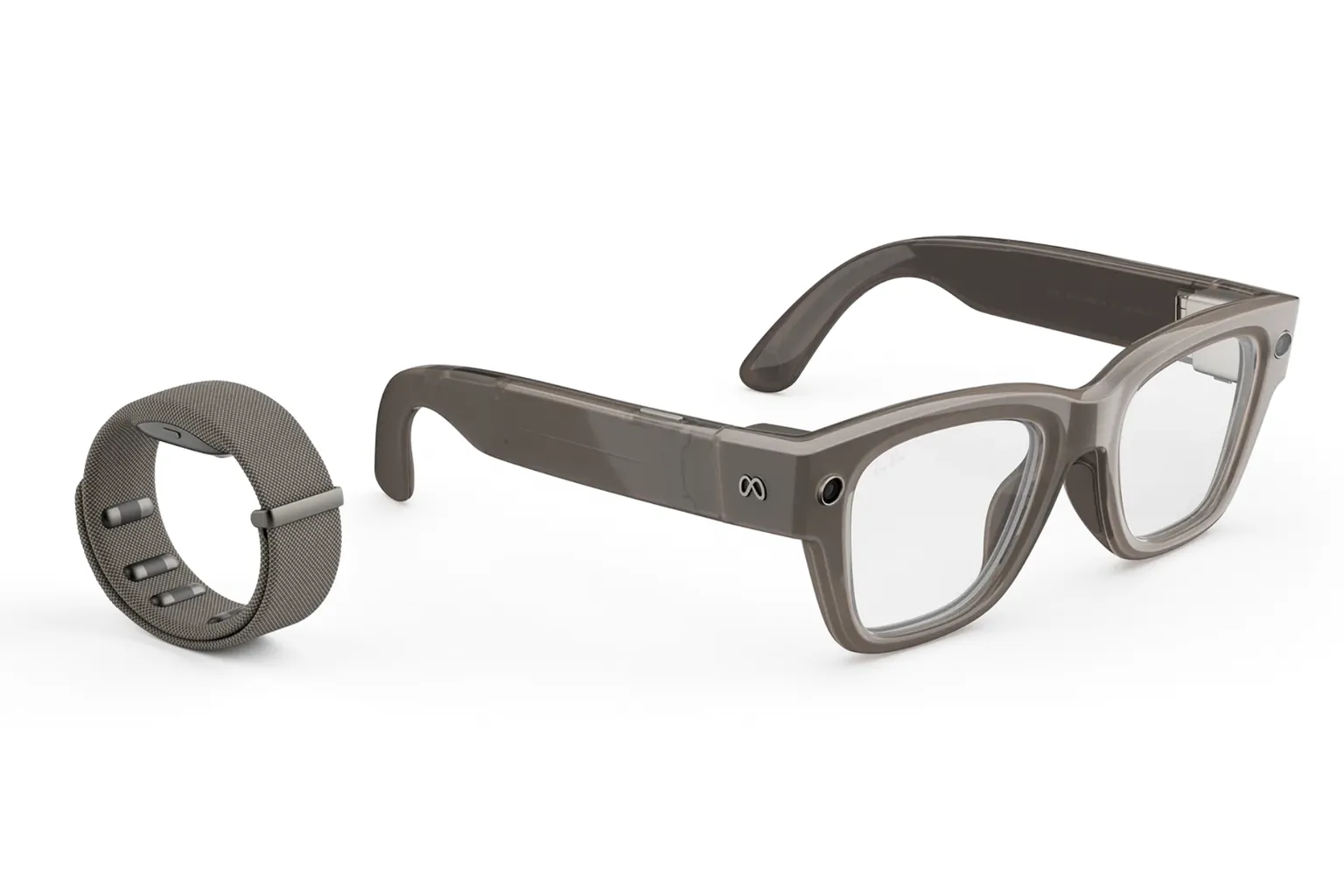
But it’s nothing like what you’re probably imagining.
When you hear “AI glasses with a display,” don’t picture Meta turning the entire lens into a screen.
It’s actually much closer to the HUD in a car—a head-up display.
When you’re driving, you might see your speed or navigation directions projected in front of you, but you’re still looking at the road ahead.
Meta Ray-Ban Display works on basically the same idea.
A small display inside the glasses projects an image onto the right lens, creating a small HUD near the edge of your vision.
And the HUD itself isn’t very large. The field of view is about 20 degrees.
Nothing appears in front of your left eye, and your entire right-eye view doesn’t turn into a screen either.
So this isn’t something you use to watch movies, scroll through Facebook for hours, or play VR games.
Still, it supports a 600 × 600 full-color display, so it can show things like photos, maps, and a camera preview.
The idea is more like this.
A message comes in, so you glance at it. You’re looking for a place, so you check navigation.
Someone speaks to you in another language, so you read the real-time translation subtitles.
You ask Meta AI a question and check the answer.
You’re taking a photo, so you check whether the framing looks right.
All of that is information you only need to look at for a few seconds. But when it comes to text, reading it is faster than listening to it.
But wait.
Isn’t this basically the Scouter the Saiyans wore in Dragon Ball?
The Scouter only covered one eye too. Most of the time, they were still looking at the real world normally. Information only appeared beside their vision when they needed it.
Look at an ordinary Earthling.
Power level: 5.
Look at Goku.
Power level: 8,000…
No, wait. It’s still going up!

I’m starting to think someone on Meta’s AI glasses team must be a hardcore Dragon Ball fan.
That said, Meta AI still hasn’t evolved far enough to show the power level of the person standing next to you.
With Meta AI glasses that don’t have a display, it felt like having the Pharaoh from Yu-Gi-Oh! beside you, quietly giving you the answer in your ear.
With Meta Ray-Ban Display, it’s like the Pharaoh from Yu-Gi-Oh! can finally show you the answer instead of whispering it in your ear.
Meta Quest and AI Glasses Are Really Going in Different Directions
By this point, I think the difference between Meta AI glasses and Meta Quest VR headsets is probably pretty clear.
The part that gets genuinely confusing is when you actually try to buy one.
The first time I opened Meta’s official site, I saw Ray-Ban Meta, Oakley, Meta Glasses, and Meta Ray-Ban Display all mixed together. Then there were different frames, different colors, clear lenses, polarized lenses, transition lenses, and even prescription options.
What was Meta’s sales team thinking when they made the page this confusing?
At first glance, it looks like there are dozens of different AI glasses to choose from. In reality, a lot of them use the same basic system and only differ in the frame or lenses.
But if it’s your first time looking at all of this, it’s genuinely confusing.
One more thing: the Meta Ray-Ban Display, which has a built-in display, is currently only available in the US through select physical retail locations. You still can’t buy it online.
You can buy Meta AI glasses on Amazon, but Meta’s official site has more options, and you can also purchase a two-year extended warranty.
Ray-Ban Meta, Oakley Meta, and Meta Glasses are all AI glasses without a display, and each comes with a variety of frame and lens options.
I think that extended warranty is a pretty good deal.
FAQ – Common Questions
Are Meta AI Glasses Just a Smaller Meta Quest?
No.
Meta Quest is mainly designed to put VR or MR visuals in front of your eyes and take you into a virtual world.
Meta AI glasses are built around the real world instead. They use cameras, microphones, speakers, and Meta AI to recognize what you’re looking at, answer questions, translate things, and help with small everyday tasks.
You wear both on your head, but they’re heading in completely different directions.
Does Ray-Ban Meta Have a Display?
The standard Ray-Ban Meta does not have a display.
What you see looks almost the same as it does through a normal pair of glasses. You mainly interact with Meta AI through the built-in cameras, microphones, and speakers.
If you want to see text or images in front of you, you need a model with a display, such as Meta Ray-Ban Display.
Can You Watch Netflix or Play VR Games on Meta Ray-Ban Display?
That’s not really what it’s designed for.
The display area is meant for quickly checking things like messages, navigation, translation subtitles, Meta AI answers, photos, and the camera preview.
It isn’t meant to replace your phone screen, and it isn’t a smaller Meta Quest.
What Can Meta AI Glasses Do?
The biggest thing is that the AI can see what you’re looking at.
For example, you can look at a building and ask, “What is this place?” You can read a menu in another language, translate a sign, or ask questions about something right in front of you.
You can also use the glasses to take photos and videos, listen to music, and answer phone calls.
Some things that used to require pulling out your phone can now be done just by looking at what’s in front of you and asking out loud.