
I picked up the Lovense Solace Pro to see how well it works with SexLikeReal VR videos and how it compares to The Handy series. It’s a wireless automatic stroker with a desk mount, up to 14 hours of battery life, and a current sale price of $199.
In this hands-on review, I’ll cover the unboxing, SexLikeReal setup with DeoVR Classic, and comparisons with the original Handy and Handy 2 Pro. I’ll also share my real-world experience with their stroke speed, intensity, mounting options, and operating noise to help you decide which one suits you better.
What Is Solace Pro?
Lovense released the Solace Pro in 2024 as the successor to the original Solace. Like the Handy, it uses a motor to move the sleeve up and down. It can also sync with VR adult videos, making the stroker move in time with what’s happening in the video.
Solace Pro has a built-in battery and can be controlled directly using the buttons on the device. You can also use the Lovense Remote app to adjust the speed, stroke length, and movement patterns. It also supports long-distance control and VibeMate AI Sync, which analyzes video footage and automatically generates matching movements.
For those of us who use VR, the more useful features are script-based synchronization, which lets the stroker follow the action in VR adult videos, and PCVR game integration, which lets the device respond to what’s happening in a game. VibeMate AI Sync and remote control aren’t particularly useful for VR gaming, so I won’t cover those two features in this article.
Solace vs. Solace Pro: Key Differences
The Solace Pro increases the maximum stroke length from 70 mm to 79 mm and the maximum stroke rate from 280 to 300 strokes per minute. It also offers more precise position control. However, it’s 220 g heavier than the original Solace, bringing the total weight to 1,200 g, roughly the same as a 1.25-liter bottle of Coke. That’s pretty heavy to hold throughout an entire video.
| Specs | Solace | Solace Pro |
|---|---|---|
| Weight | 980 g | 1,200 g |
| Maximum Stroke Length | 70 mm | 79 mm |
| Maximum Stroke Rate | 280 strokes/min | 300 strokes/min |
| Charging | Proprietary charging connector | USB-C |
| Regular Price | $369 / £299 | $399 / £319 |
| Sale Price | $184 / £149 | $199 / £159 |
With the two models currently on sale for just $15 (£10) apart, I think the Solace Pro is the better deal. The newer model offers improvements in speed, stroke length, and control features.
Solace Pro Unboxing and Accessories
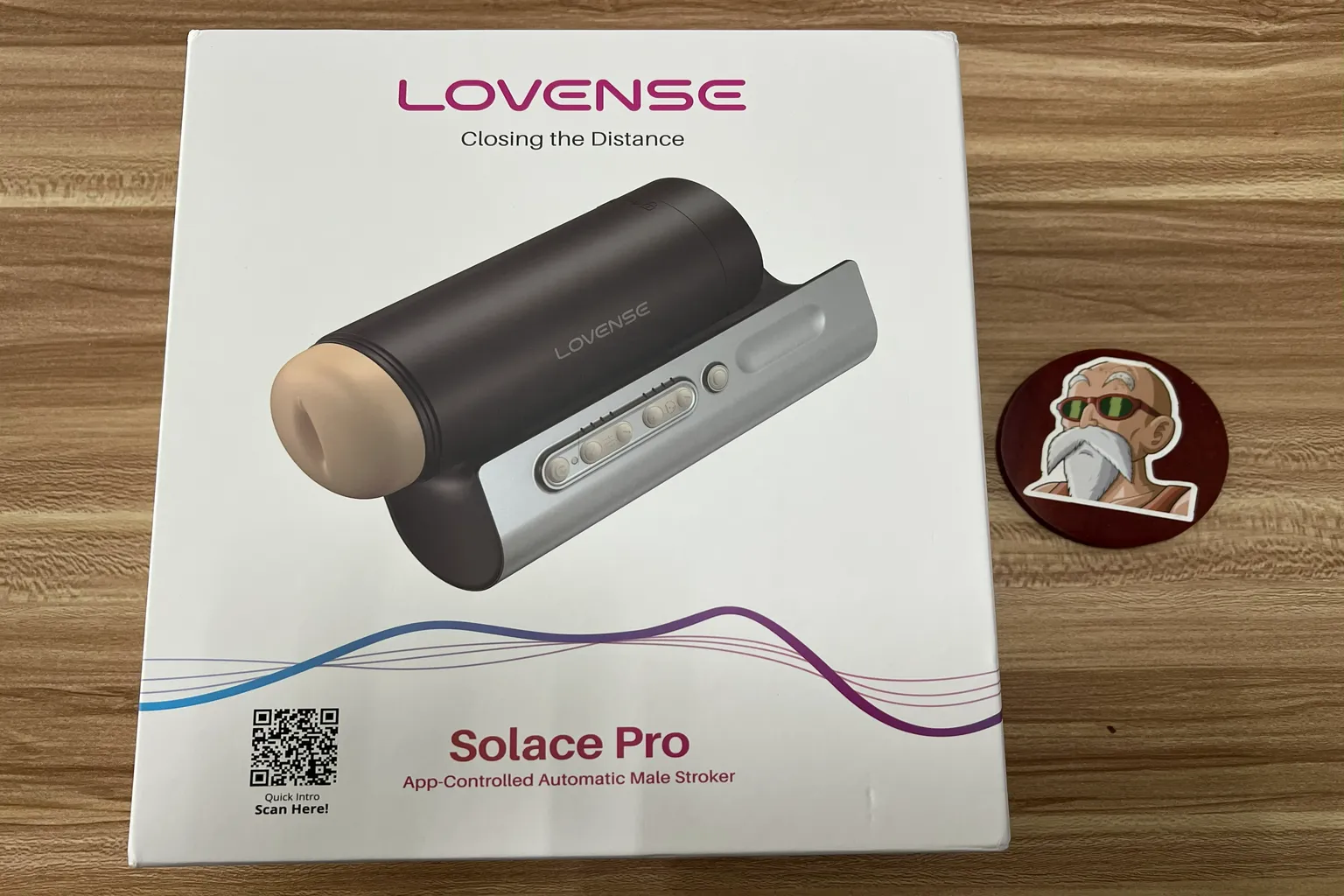
Let’s take a look at the Solace Pro I bought. When it arrived, it came in a thin cardboard shipping box with no product name on it. However, once I opened the shipping box, the retail packaging made it pretty obvious that there was an automatic stroker inside. I’d recommend keeping the box out of sight.
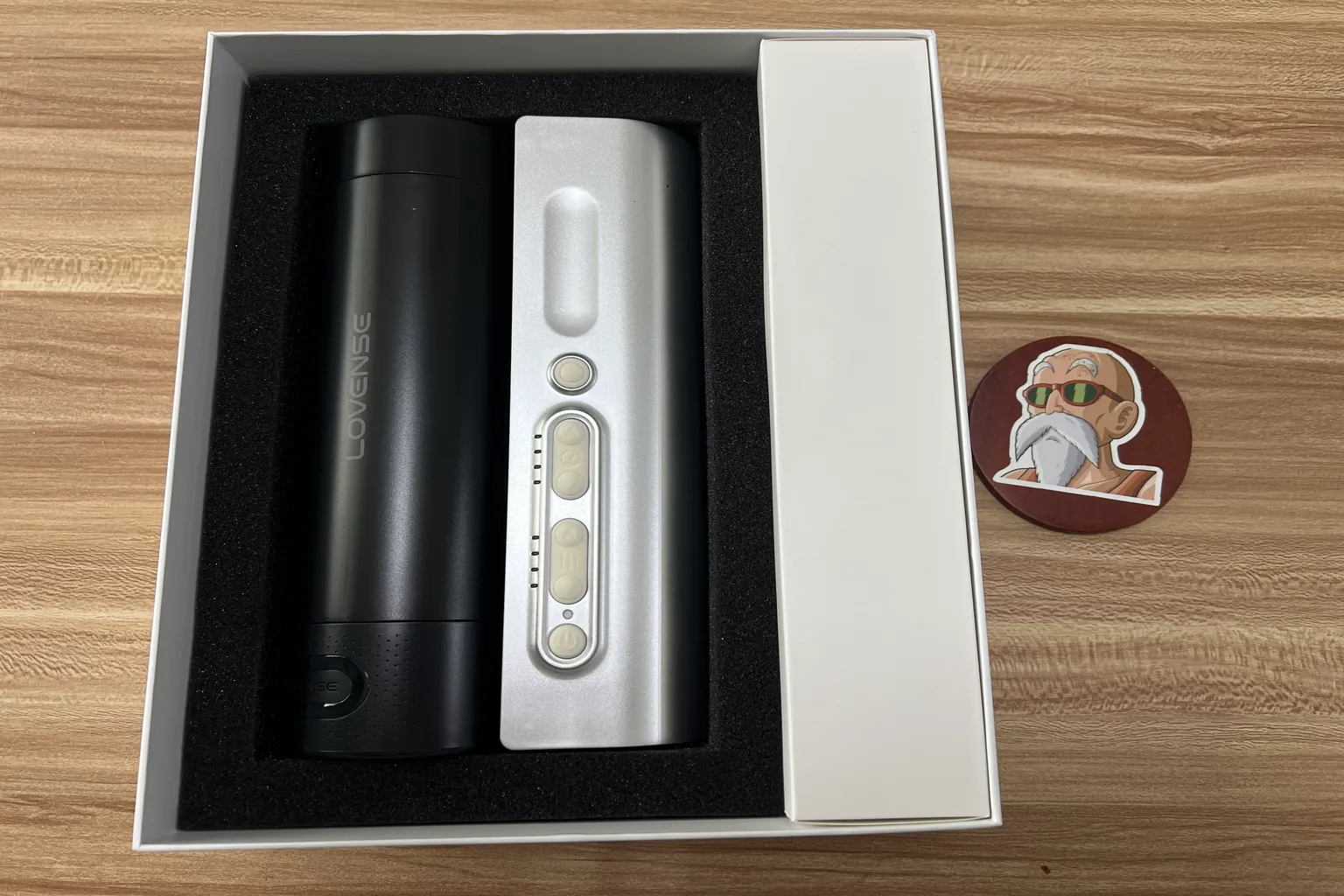
Inside the box, the main unit is surrounded by protective foam, with a white accessory box on the right.
After taking everything out of the box, here’s what’s included:
- Solace Pro main unit with the original stroker sleeve
- Desk mounting bracket
- USB-C charging cable
- User manual
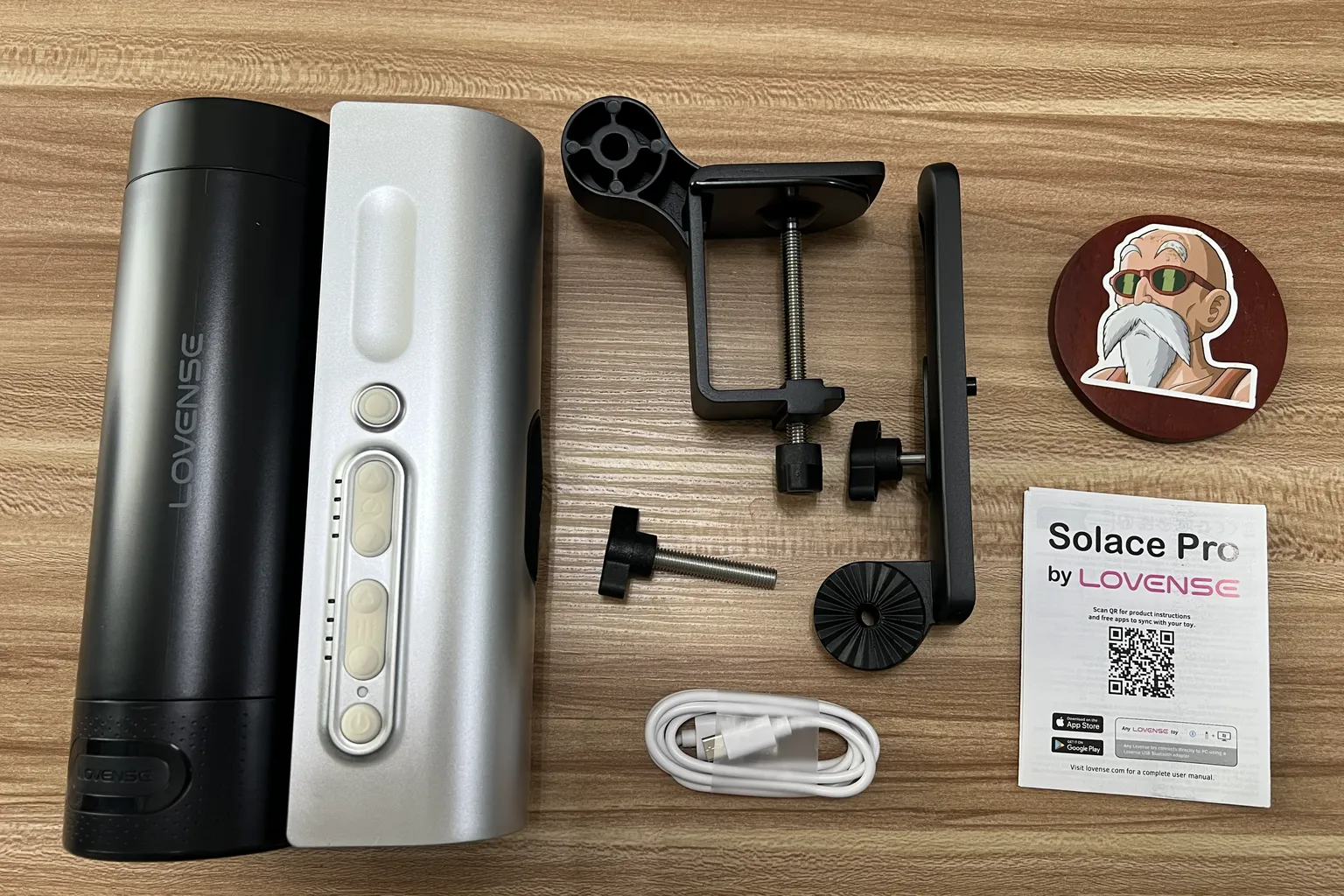
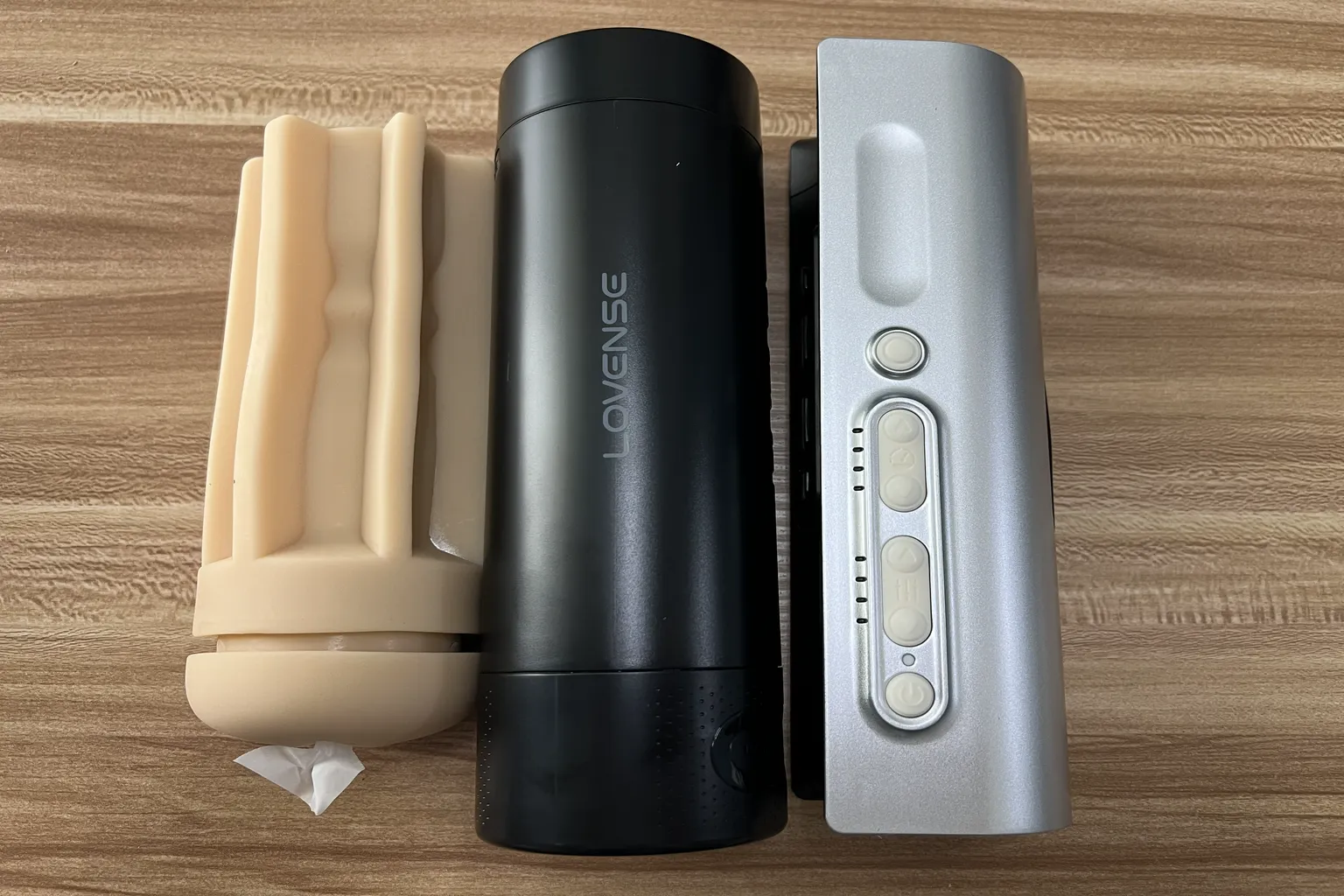
The Solace Pro actually has two main parts. The black cylinder is the outer housing for the stroker sleeve, while the silver section is the main unit. There are buttons for power, speed, stroke length, and movement modes, so you can control it directly. If you want to use it with SexLikeReal, you’ll need to connect through the Lovense Remote app.
The stroker sleeve is made of TPE and can be removed from the black housing for cleaning after use. Lovense also sells different replacement sleeves. If you’ve seen The Handy before, you’ll probably be surprised by how much bigger both the Solace Pro main unit and its stroker sleeve are compared to The Handy series.
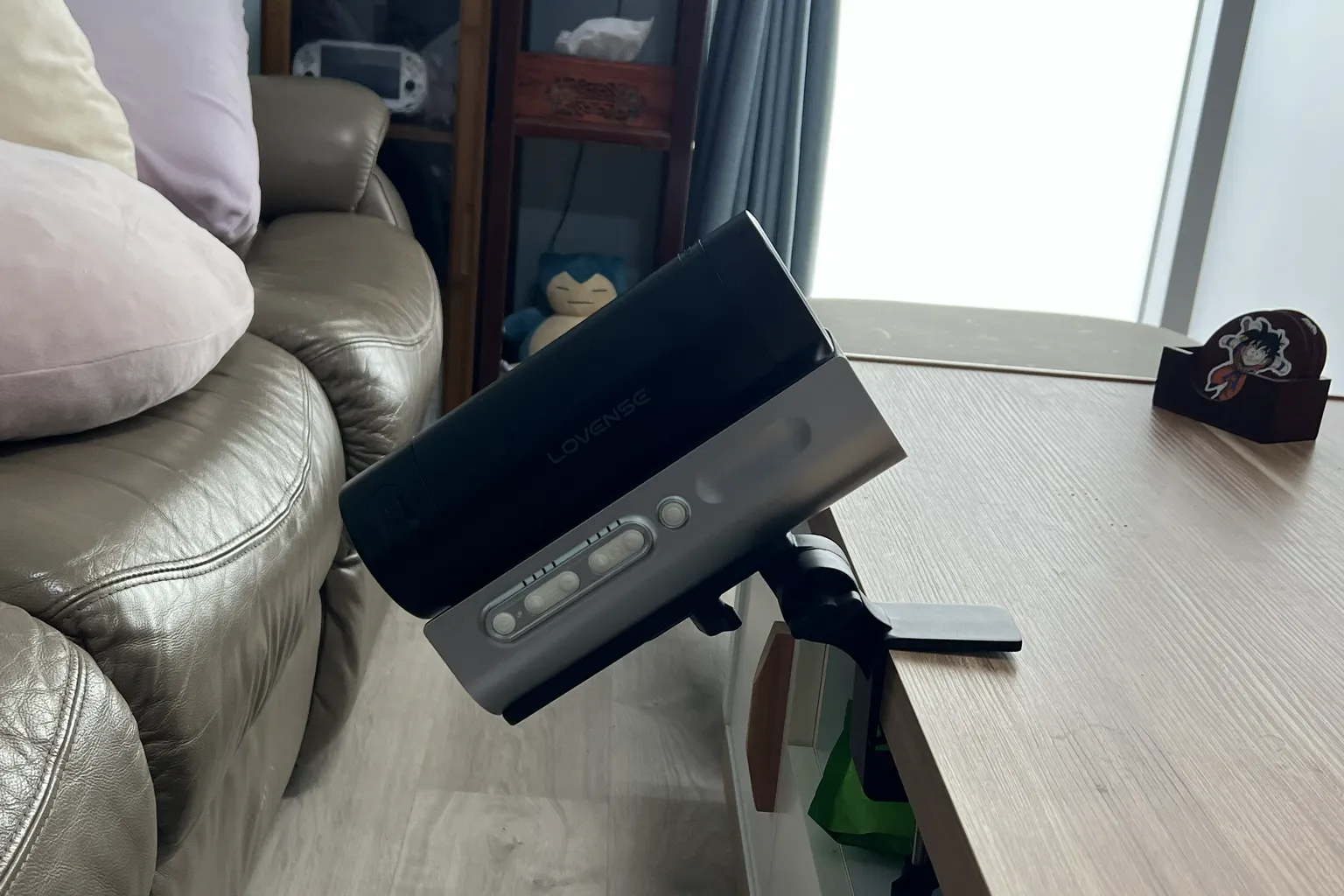
The Solace Pro comes with a desk mount that you can clamp to the edge of a desk or coffee table for hands-free use. When watching SexLikeReal in VR, you won’t have to hold the stroker the whole time, making it much more comfortable to use.
The mount consists of a desk clamp, mounting plate, adjustment screws, and a few other parts. Assembly is pretty straightforward. However, the mount only has one pivot point, so you’ll need to get your desk and chair heights right. Otherwise, it can be uncomfortable to use.
How to Connect Solace Pro to SexLikeReal
To use the Solace Pro while watching SexLikeReal, you’ll need to complete a few software setup steps first. Here’s how to get everything connected.
Before you begin, make sure Wi-Fi and Bluetooth are enabled on your phone or tablet, and turn on the Solace Pro.
Step 1: Install Lovense Remote and Pair Solace Pro
On your phone or tablet, search for Lovense Remote in the Apple App Store or Google Play and install it.
Open the Lovense Remote app, tap the “+” icon in the upper-right corner of the main screen, then select Add Toy.
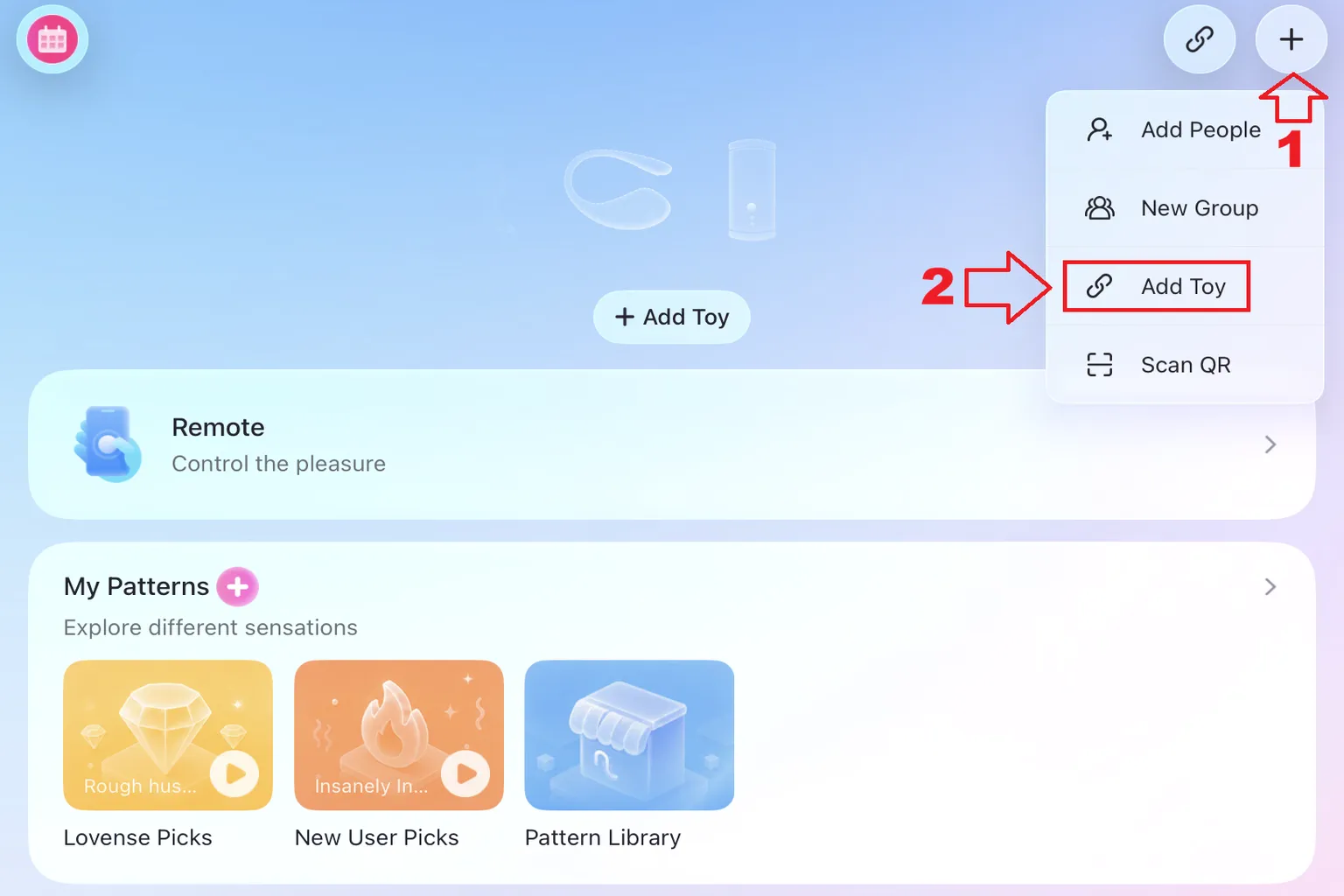
Lovense Remote will automatically scan for nearby devices. Once it finds your Solace Pro, tap it to connect.

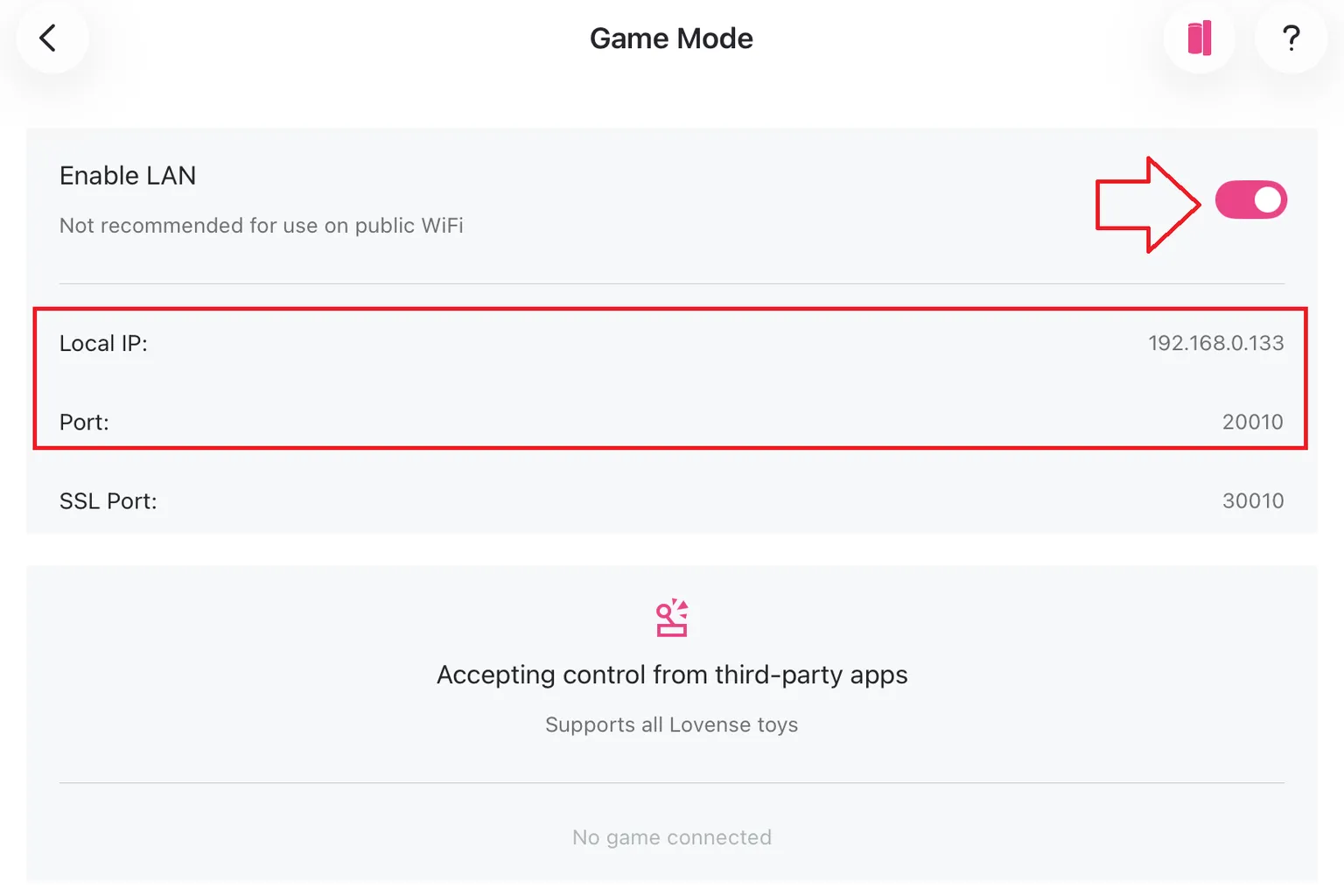
Next, return to the app’s home screen, tap Game Mode at the bottom, and enable LAN.
The Local IP and Port shown below are the connection details you’ll need later to connect your Solace Pro to SexLikeReal through DeoVR Classic.
Step 2: Connect Solace Pro to DeoVR Classic
There are two versions of DeoVR available on the Meta Horizon Store, and it’s important to choose the right one:
- DeoVR Classic: The original version, which works like a regular app. You must use this version to connect Lovense devices.
- DeoVR: The newer version, formerly known as DeoVR Hyper. It works more like a web browser and doesn’t support Lovense devices.
Launch DeoVR Classic, open the SexLikeReal website, then go to Settings → Haptics.
Next, scroll down to the Lovense Remote section and enter the IP address and port number you got earlier.
For example, if your connection details are:
- Local IP: 192.168.0.133
- Port: 20010
Enter 192.168.0.133:20010 in the field.
Once you’ve entered the details, select Connect to complete the connection.
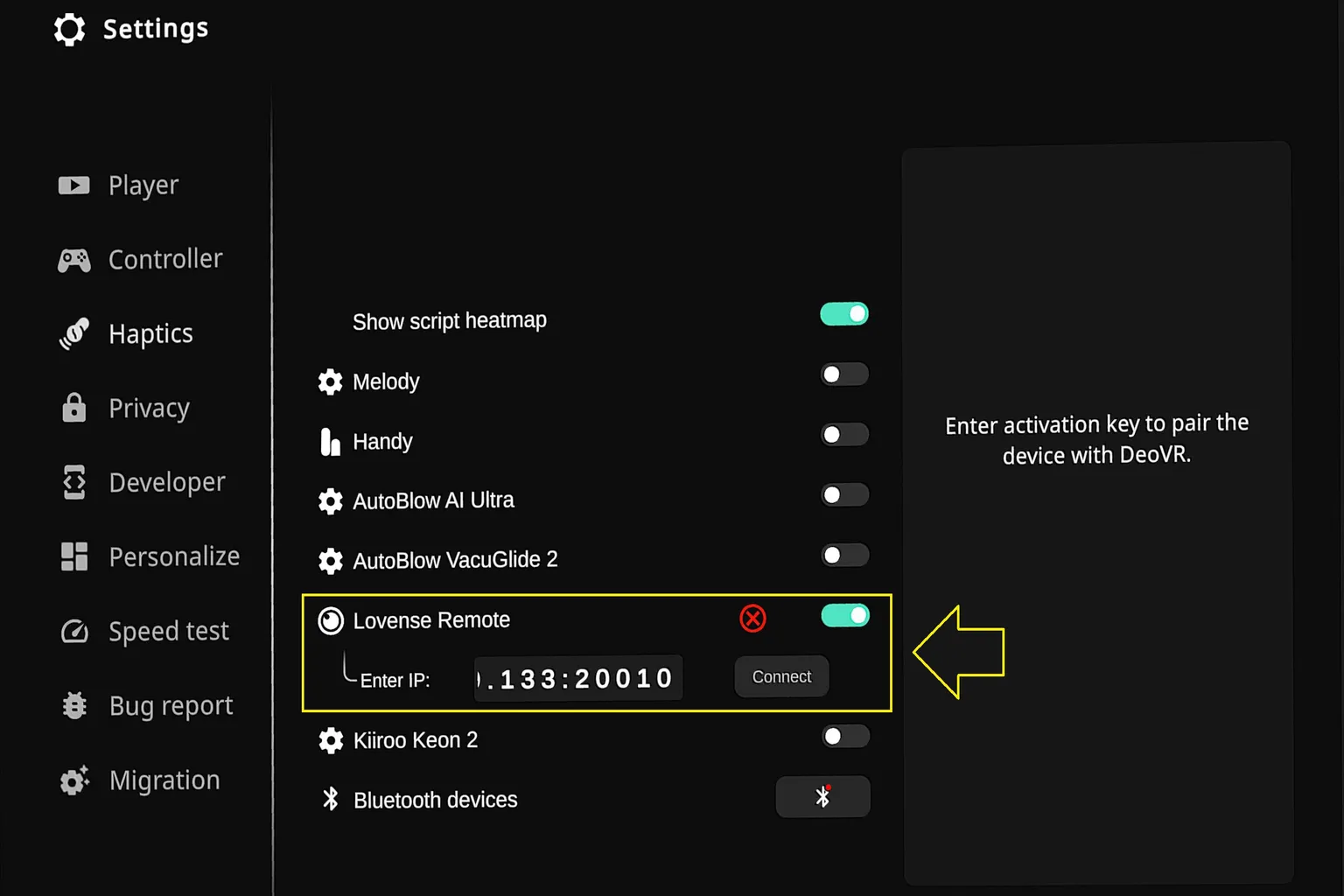
If you enter only the IP address without the port number, the connection won’t work.
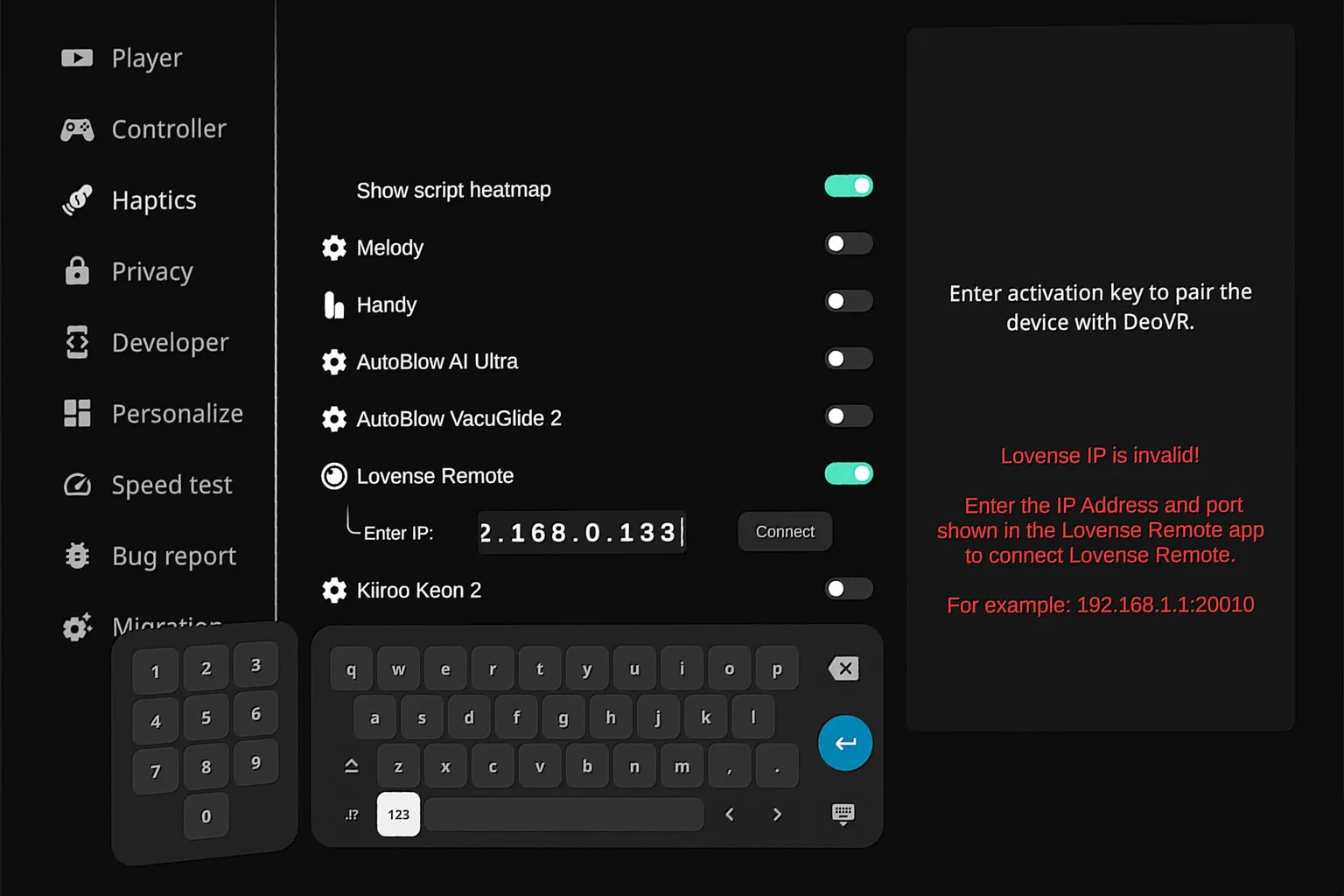
However, DeoVR Classic version 15.10.3947 has a bug. When you select the “.!?” button to switch to the symbols keyboard, it briefly flashes before switching right back to the English keyboard.
Since you can’t access the symbols keyboard, there’s no way to enter the “:” character, which means you can’t connect the Solace Pro to SexLikeReal!
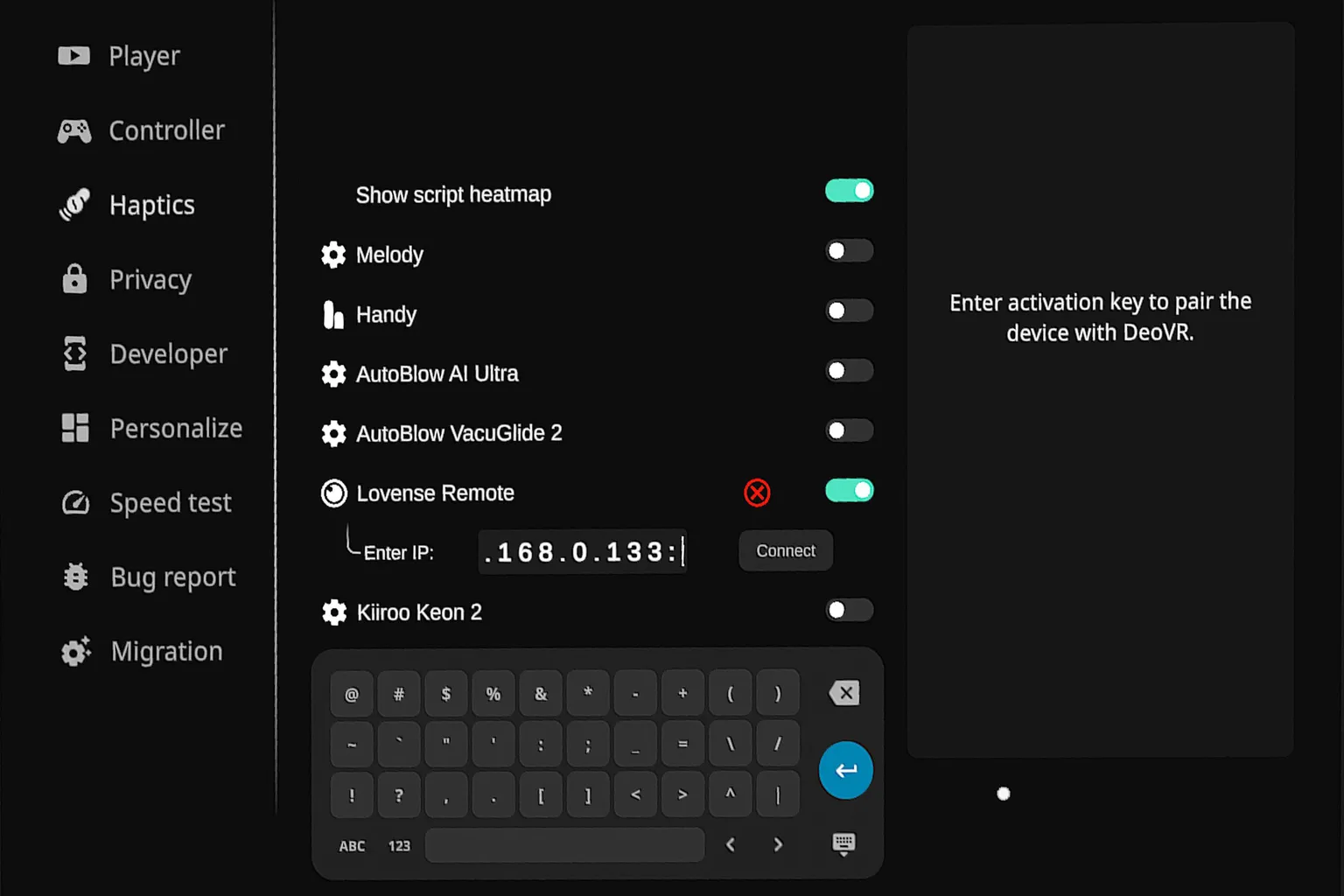
I found a workaround for this bug. After selecting the “.!?” button, quickly move the cursor to where the letter keys are and click again while the keyboard is flashing. If you manage to hit a key at just the right moment, you can switch to the symbols keyboard.
You can see how it works in the video below:

Step 3: Watch Interactive Videos
Once you start playing an interactive video on SexLikeReal, the Solace Pro will follow the script and sync its movements with the performers in real time, making the experience feel more immersive.
After the first successful connection, the Solace Pro will automatically reconnect whenever you open SexLikeReal, so you won’t need to set it up again.
How to Buy Solace Pro from Lovense
The Solace Pro has a regular price of $399, but it’s currently 50% off at just $199. Shipping is free to the US, UK, and Australia, while shipping to Singapore costs $12. For buyers in those countries, the delivered total is just $199–$211.
While the price is the same as Amazon, buying directly from Lovense gives me more peace of mind when it comes to warranty coverage. The official store also has the widest selection of products, and accessories are often discounted, making it a good place to pick up a few extras.
Here’s how to order from the official website:
Step 1: Go to the Official Lovense Store
First, visit the official Lovense Solace Pro website. You can find the Solace Pro on the homepage or under the For Him section. Click Buy Now to start your order.
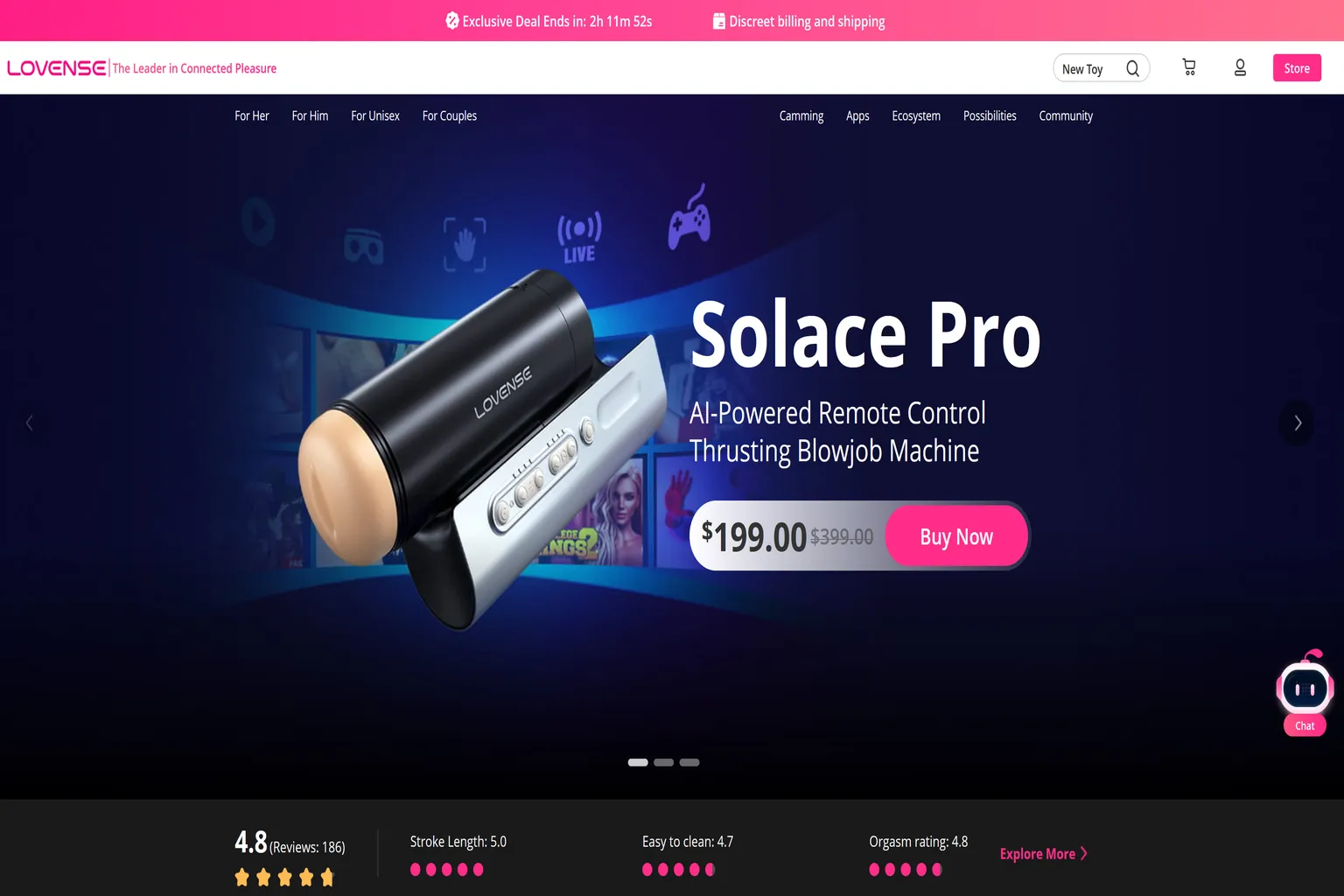
After clicking Buy Now, the Lovense website will show you bundle offers with other products. For example, you can get the Solace Pro bundled with the Edge 2, giving you two Lovense toys designed for different purposes.
The Edge 2 is mainly for long-distance play with your girlfriend or wife. If you’re only buying the Solace Pro to watch SexLikeReal, you don’t need the extra toy. I’d recommend clicking No Thanks to skip the bundle.

Step 2: Check the Price and Shipping Cost
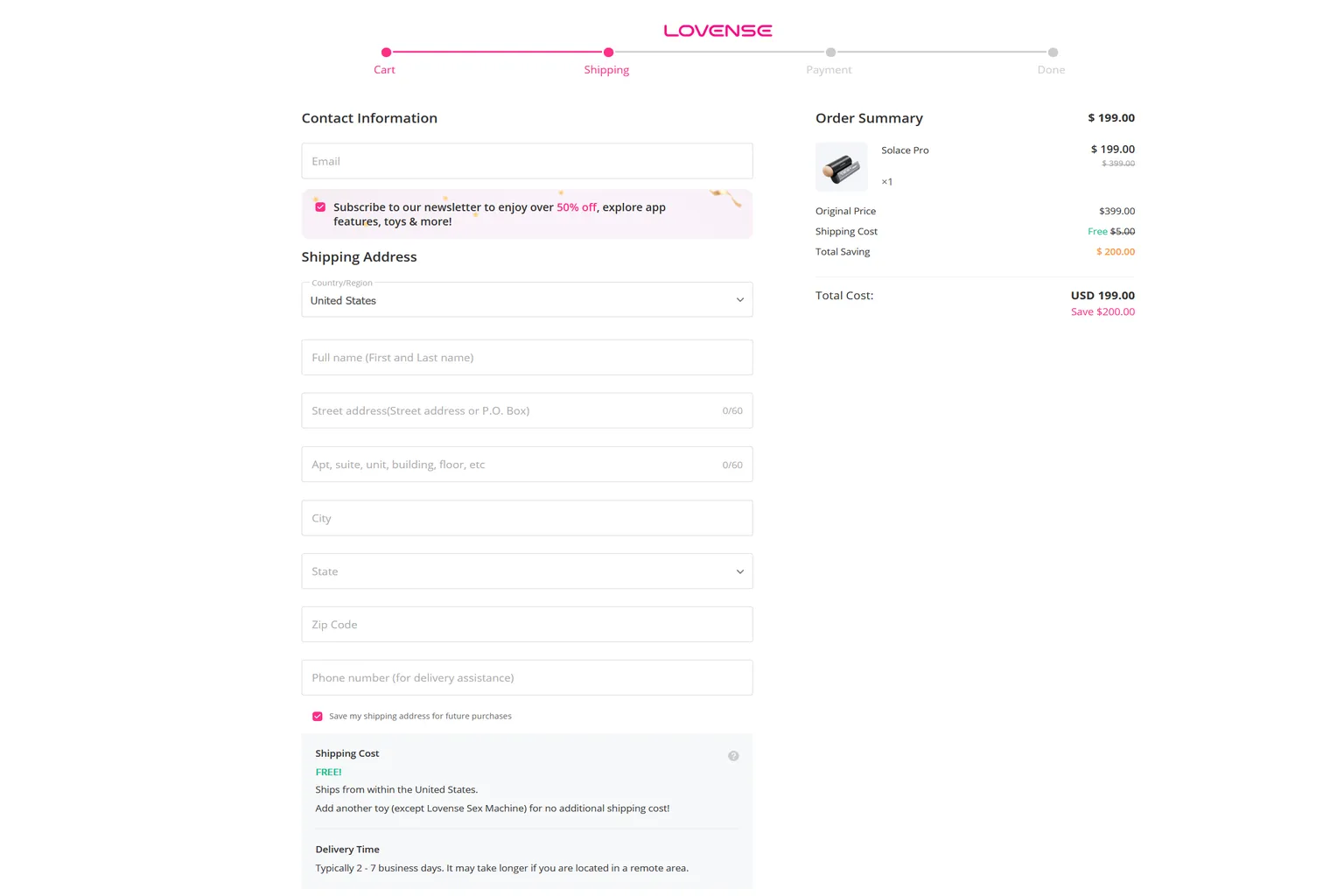
On the cart page, you’ll see the original price, estimated shipping cost, discount amount, and order total.
You can also add extra accessories or stroker sleeves to your order. I think one of Lovense’s biggest advantages is how affordable its replacement sleeves are!

Step 3: Enter Your Shipping Address
On the checkout page, enter your email address first, then select your country under Country/Region. Shipping costs vary by country. Shipping is free to the US, UK, and Australia, while shipping to Singapore costs $12.
Next, enter the recipient’s name, shipping address, and phone number. Delivery usually takes 3–5 days after placing your order.
Solace Pro vs. The Handy Series: Hands-On Comparison
I’ve previously compared the original Handy with the Handy 2 Pro. This time, I’m adding the Solace Pro to compare all three devices side by side, including their size, stroker sleeves, mounting options, and operating noise.
The Solace Pro’s biggest advantage over the Handy 2 models is its price. For just $199, you get a wireless automatic stroker that even comes with a desk mount. However, it has a slower stroke speed, shorter stroke length, and weighs significantly more than The Handy series.
Specs Comparison
Let’s start by comparing the key specs of the Solace Pro and The Handy series. Along with the original Handy and the Handy 2 Standard, I’ve also included my own Handy 2 Pro.
The Solace Pro has a stroke length of just 79 mm, which is 31 mm shorter than the original Handy’s 110 mm and 46 mm shorter than The Handy 2’s 125 mm. The shorter stroke length also makes the Solace Pro feel less intense. With the same SexLikeReal video, I can only last about 2 minutes using The Handy 2 Pro, but with the Solace Pro, I can easily go over 5 minutes.
| Specs | The Handy 1 | Solace Pro | Handy 2 | Handy 2 Pro |
|---|---|---|---|---|
| Weight | 700 g 👑 | 1,200 g | 805 g | 810 g |
| Maximum Stroke Length | 110 mm | 79 mm | 125 mm 👑 | 125 mm 👑 |
| Stroke Speed | Up to 600 strokes/min | Up to 300 strokes/min | 32–400 mm/s | 32–450 mm/s 👑 |
| Power | Plug-in | Battery | Battery | Battery |
| Battery Life | — | Approx. 14 hours 👑 | Approx. 1 hour | Approx. 5 hours |
| Connectivity | Wi-Fi / Bluetooth | Bluetooth | Wi-Fi / Bluetooth | Wi-Fi / Bluetooth |
| Mount | Sold separately | Included 👑 | Sold separately | Sold separately |
| Regular Price | $199 👑 | $399 | $299 | $499 |
| Sale Price | $119 👑 | $199 | $254 | $424 |
The sale prices for The Handy 2 and Handy 2 Pro already include the 15% discount with the “VRPUPU” promo code.
Size and Weight Comparison
Putting all three devices side by side, you can clearly see that the Solace Pro is much wider than the other two. It has a black cylindrical housing paired with a silver motor assembly, with the stroker sleeve and motor positioned on opposite sides. The whole device looks pretty bulky.
The original Handy has a longer, slimmer cylindrical design, with the stroker sleeve attached to an external sliding mechanism. The Handy 2 Pro, on the other hand, has a more compact, boxy design and is noticeably smaller.
There’s also a big difference in weight between the three devices:
- Original Handy: 700 g
- The Handy 2 Pro: 810 g
- Solace Pro: 1,200 g
The Solace Pro is 390 g heavier than The Handy 2 Pro, which is a pretty big difference. When using it handheld, you not only have to support the weight of the device but also deal with the vibrations while it’s running. However, if you mount it to a desk, the extra weight becomes much less of an issue.

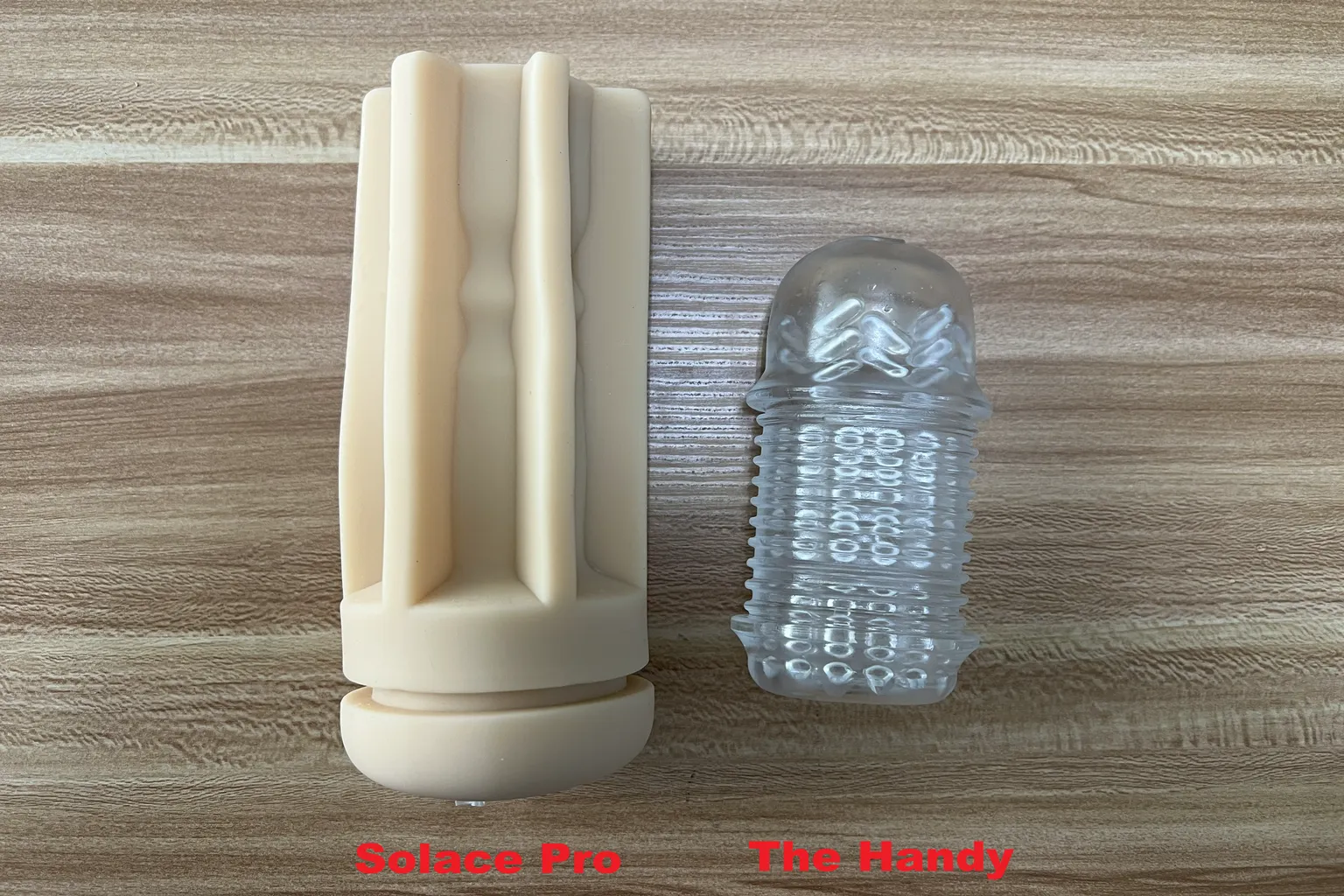
Besides the design of the main units, the two brands also use very different stroker sleeves. The Solace Pro uses a beige TPE sleeve that’s longer and thicker overall. For guys who are particularly well-endowed, that should be a plus. However, cleaning takes more effort. After use, you need to turn the entire sleeve inside out to wash it, then let it dry completely.
The Handy uses a transparent stroker sleeve, which is much easier to clean and dry. The sleeves from the two brands are also very different in size, so you can’t simply swap them between devices.
Desk Mount Comparison
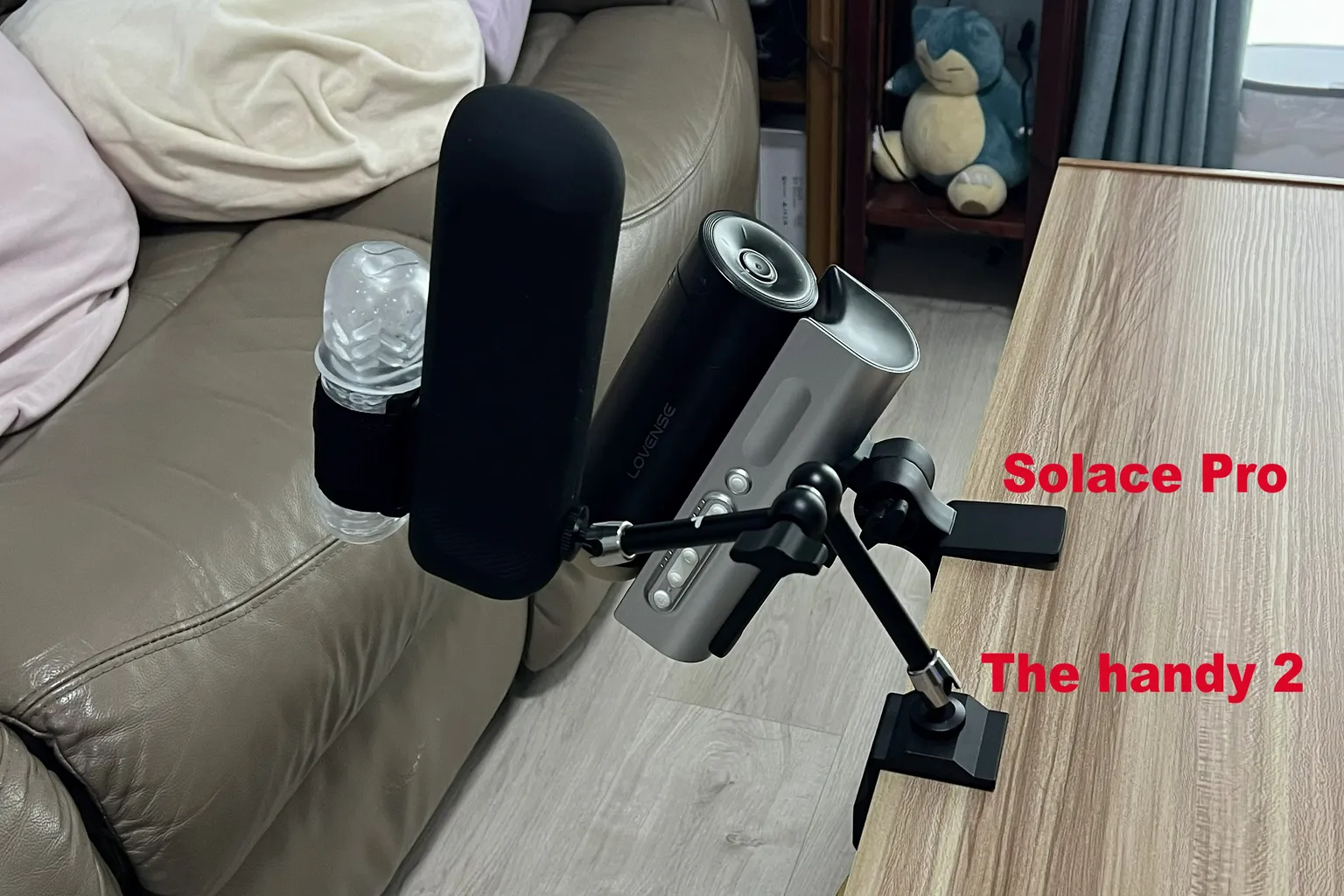
The Solace Pro comes with a desk mount, while The Handy 2 requires you to purchase the Desk Mount Kit – Handsfree separately for $59.
The two mounts have different designs. The Solace Pro uses a clamp that attaches to the edge of a desk, allowing you to adjust the device’s height and tilt with two adjustment points. The Handy 2 also attaches to the edge of a desk, but uses an adjustable arm with three main adjustment points, giving you more flexibility to change the angle and position of the device.

When setting up the Solace Pro desk mount, I’d recommend having your desk about 10–15 cm (4–6 inches) higher than your chair seat for a more comfortable angle. With The Handy’s Desk Mount Kit – Handsfree, you can still adjust the device to a comfortable angle even if your desk and chair seat are at roughly the same height.
Operating Noise Test
Automatic strokers produce some mechanical noise while running. When watching VR adult videos, one concern is whether the noise is loud enough for someone outside the room to hear.
For this test, I used a noise measurement app on my iPhone to measure the operating noise of the original The Handy, The Handy 2 Pro, and Solace Pro at different stroke speeds, recording the results in decibels (dB).
Here are the test results. Lower numbers mean quieter operation:
| Stroke Speed | Handy 1 | Handy 2 Pro | Solace Pro |
|---|---|---|---|
| 50% | 43dB | 36dB | 45dB |
| 100% | 53dB | 40dB | 50dB |
The test results show that the Solace Pro is about as loud as the original The Handy, with both producing more noise than The Handy 2 Pro. While neither is loud enough to attract much attention, you can still hear some noise from outside the room if the device is close to the door. So it’s worth choosing where you use it.
Below are videos of the Solace Pro and The Handy 2 Pro running at 100% and 50% speed, so you can hear the difference and decide whether the noise level is acceptable.

Final Verdict: Solace Pro vs. The Handy
The Solace Pro has a shorter stroke length and slower speed, so it feels less intense. But looking at it another way, the lower intensity means I can spend more time actually watching the video, so maybe that’s not such a bad thing after all…
Its biggest advantages are the included desk mount, excellent battery life, and affordable accessories like replacement stroker sleeves. However, the weight is definitely a downside. When watching videos, I still have to put some effort into keeping the device steady.
If you’re looking for an affordable wireless interactive stroker, I think the Solace Pro is well worth recommending. But if you’re willing to spend over $200, I still prefer the Handy 2 series.

The Ultimate Guide to The Handy
3 Models Compared & 15% OFF Discount Code
The Handy 2 vs The Handy 1
Is It Worth Upgrading?
Frequently Asked Questions
Does the Lovense Solace Pro work with SexLikeReal VR videos?
Yes. The Solace Pro supports script-based synchronization with SexLikeReal (SLR), allowing the stroker to move in sync with VR adult videos. To connect it, you’ll need the Lovense Remote app and DeoVR Classic. Once connected, the Solace Pro will follow the video’s interactive script automatically.
Can I connect the Solace Pro to the latest DeoVR app?
No. The newer DeoVR app, previously called DeoVR Hyper, doesn’t support Lovense device connections. You’ll need to use DeoVR Classic instead.
In DeoVR Classic, go to Settings → Haptics and enter the Local IP and Port shown in the Lovense Remote app. Make sure to include both values when connecting.
What’s the difference between the Lovense Solace and Solace Pro?
The Solace Pro increases the maximum stroke length from 70 mm to 79 mm and the maximum stroke rate from 280 to 300 strokes per minute. It also offers more precise position control and uses USB-C charging instead of a proprietary connector.
However, the Solace Pro weighs 1,200 g compared to the original Solace’s 980 g. With the current sale prices only $15 apart, I think the Pro is the better deal.
Is the Solace Pro better than The Handy 2 Pro?
It depends on what you’re looking for. The Solace Pro costs less, comes with a desk mount, and offers approximately 14 hours of battery life.
The Handy 2 Pro, on the other hand, has a longer 125 mm stroke, faster movement, a lighter body, and quieter operation. In my tests, the Handy 2 Pro also felt noticeably more intense.
If you’re looking for an affordable wireless stroker, I’d recommend the Solace Pro. But if you’re willing to spend more, I still prefer the Handy 2 Pro.
How much does the Lovense Solace Pro cost, and is shipping free?
The Solace Pro has a regular price of $399, but it’s currently on sale for $199 through the official Lovense store.
Shipping is free to the US, UK, and Australia. Shipping to Singapore costs $12, bringing the total to $211.
The package also includes a desk mount, so you don’t need to buy a separate mounting kit for hands-free use.
